
PS C:\Users\steve> wsl.exe --list --online
The following is a list of valid distributions that can be installed.
Install using 'wsl.exe --install <Distro>'.
NAME FRIENDLY NAME
Ubuntu Ubuntu
Ubuntu-24.04 Ubuntu 24.04 LTS
openSUSE-Tumbleweed openSUSE Tumbleweed
openSUSE-Leap-16.0 openSUSE Leap 16.0
SUSE-Linux-Enterprise-15-SP7 SUSE Linux Enterprise 15 SP7
SUSE-Linux-Enterprise-16.0 SUSE Linux Enterprise 16.0
kali-linux Kali Linux Rolling
Debian Debian GNU/Linux
AlmaLinux-8 AlmaLinux OS 8
AlmaLinux-9 AlmaLinux OS 9
AlmaLinux-Kitten-10 AlmaLinux OS Kitten 10
AlmaLinux-10 AlmaLinux OS 10
archlinux Arch Linux
FedoraLinux-43 Fedora Linux 43
FedoraLinux-42 Fedora Linux 42
Ubuntu-20.04 Ubuntu 20.04 LTS
Ubuntu-22.04 Ubuntu 22.04 LTS
OracleLinux_7_9 Oracle Linux 7.9
OracleLinux_8_10 Oracle Linux 8.10
OracleLinux_9_5 Oracle Linux 9.5
openSUSE-Leap-15.6 openSUSE Leap 15.6
SUSE-Linux-Enterprise-15-SP6 SUSE Linux Enterprise 15 SP6
PS C:\Users\steve> wsl.exe --install Ubuntu
The requested operation requires elevation.
Deployment Image Servicing and Management tool
Version: 10.0.26100.1150
Image Version: 10.0.26100.4061
Enabling feature(s)
[==========================100.0%==========================]
The operation completed successfully.
The requested operation is successful. Changes will not be effective until the system is rebooted.
Once installed, I set up mirroring for the net adaptors of Win11 and WSL2 to be shared, so there is no NAT required for a different WSL2 subnet than Win11 would be on. There is still a technical boundary between them where WSL2 could use it's UFW firewall as an extra layer between WSL2 and Windows Defender that protects the external boundary (that connects to the Internet via a WiFi router etc). You know mirroring is working if both WSL2 and Win11 have the same adaptors info:
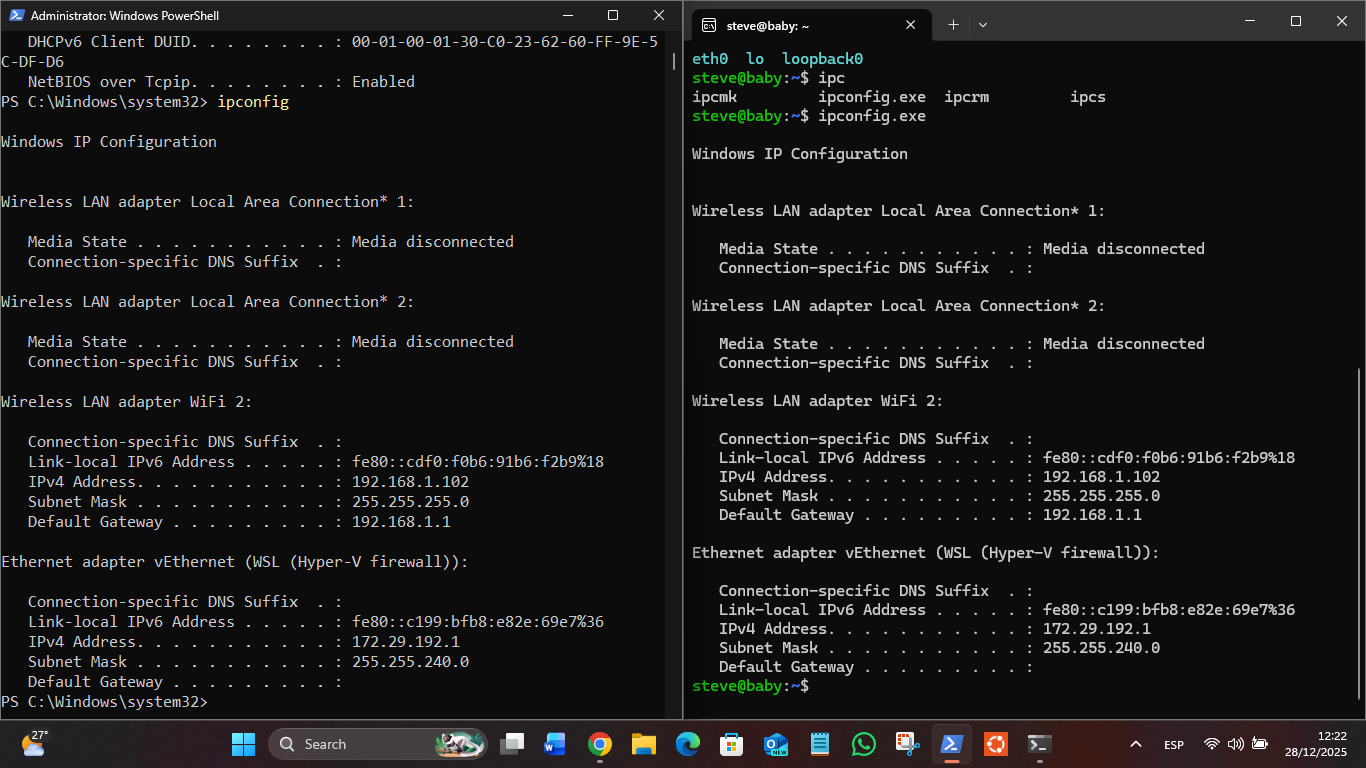
You can decide on resources you want for WSL2 using the .wslconfig file in your Win User folder:
[wsl2]
memory=4GB
processors=2
networkingMode=mirrored
dnsTunneling=true
firewall=true
autoProxy=true
You should ne able to ping across the Win11 boundary to the Internet with DNS resolution:
steve@baby:~$ ping 8.8.8.8
PING 8.8.8.8 (8.8.8.8) 56(84) bytes of data.
64 bytes from 8.8.8.8: icmp_seq=1 ttl=118 time=29.5 ms
64 bytes from 8.8.8.8: icmp_seq=2 ttl=118 time=12.8 ms
64 bytes from 8.8.8.8: icmp_seq=3 ttl=118 time=14.5 ms
^C
--- 8.8.8.8 ping statistics ---
3 packets transmitted, 3 received, 0% packet loss, time 2077ms
rtt min/avg/max/mdev = 12.776/18.928/29.540/7.535 ms
steve@baby:~$ ping google.com
PING google.com (172.217.162.142) 56(84) bytes of data.
64 bytes from gru14s19-in-f14.1e100.net (172.217.162.142): icmp_seq=1 ttl=118 time=12.9 ms
64 bytes from gru14s19-in-f14.1e100.net (172.217.162.142): icmp_seq=2 ttl=118 time=14.7 ms
Now you can do updates, install linux Apps etc. eg :
sudo apt install vim speedtest-cli
steve@baby:~$ speedtest
Retrieving speedtest.net configuration...
Testing from Telmex Colombia S.A. (186.81.100.136)...
Retrieving speedtest.net server list...
Selecting best server based on ping...
Hosted by Ufinet (Quito) [462.24 km]: 93.804 ms
Testing download speed................................................................................
Download: 89.73 Mbit/s
Testing upload speed......................................................................................................
Upload: 92.11 Mbit/s