The two prior Posts learning can be added now- for developing a future "GPS based portable Weather Station" that may even be developed through from breadboard to perf board then PCB - if my old brain can handle getting there! It's been an accidental development so far but very promising! Power is the issue - 3 sensors for the Nano USB 5V power to feed..? Hmmm..? May have to use the Uno in the final project. It could run off a 9V battery and charge via a portable solar panel...?
Here are the two current separate rigs:
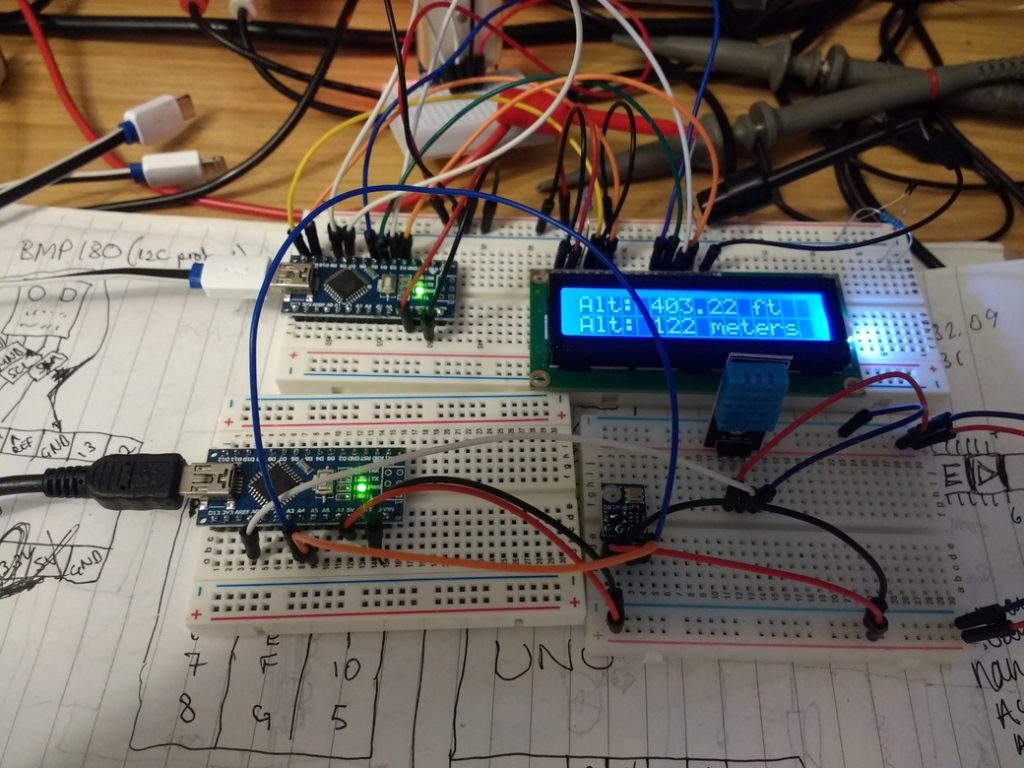
You can't run them both at the same time as the IDE sees the same Ser/USB ports in each sketch - maybe they will develop that in future?
For now, I just add the 3 wires of the DHT11 and bmp180 - A0, A4 and A5 to the GPS clock setup.
The Neo7 is already using SDA/SCL lines, so I don't know if these will conflict in the Nano/library code even though the bmp180 is on A4 and A5 as SDL/SDA lines too...?
The Nano can handle feeding 5V to all 3 sensors, with PSU feeding 4V to the LCD.
Copying the DHT11 and bmp180 code sections into the GPS clock code works:
steve_station.ino
/******************************************************************************
  TinyGPSPlus_GPS_Shield.ino
  TinyGPS++ Library Example for the SparkFun GPS Logger Shield
  By Jim Lindblom @ SparkFun Electronics
  February 9, 2016
  https://stevepedwards.today/github.com/sparkfun/GPS_Shield
  This example uses SoftwareSerial to communicate with the GPS module on
  pins 8 and 9. It uses the TinyGPS++ library to parse the NMEA strings sent
  by the GPS module, and prints interesting GPS information to the serial
  monitor.
  After uploading the code, open your serial monitor, set it to 9600 baud, and
  watch for latitude, longitude, altitude, course, speed, date, time, and the
  number of visible satellites.
  Resources:
  TinyGPS++ Library  - https://stevepedwards.today/github.com/mikalhart/TinyGPSPlus/releases
  SoftwareSerial Library
  Development/hardware environment specifics:
  Arduino IDE 1.6.7
  GPS Logger Shield v2.0 - Make sure the UART switch is set to SW-UART
  Arduino Uno, RedBoard, Pro, etc.
******************************************************************************/
//steve_station.ino - can use my 84m elevation and/or daily "local" relative pressure from: https://www.sueandalan.plus.com/weewx/index.html
#include <TinyGPS++.h> // Include the TinyGPS++ library
TinyGPSPlus tinyGPS; // Create a TinyGPSPlus object
#include <LiquidCrystal.h>
LiquidCrystal lcd(12, 11, 5, 4, 3, 2);
#define GPS_BAUD 9600 // GPS module baud rate. GP3906 defaults to 9600.
// If you're using an Arduino Uno, RedBoard, or any board that uses the
// 0/1 UART for programming/Serial monitor-ing, use SoftwareSerial:
#include <SoftwareSerial.h>
#define ARDUINO_GPS_RX 9 // GPS TX, Arduino RX pin
#define ARDUINO_GPS_TX 8 // GPS RX, Arduino TX pin
SoftwareSerial ssGPS(ARDUINO_GPS_TX, ARDUINO_GPS_RX); // Create a SoftwareSerial
// Set gpsPort to either ssGPS if using SoftwareSerial or Serial1 if using an
// Arduino with a dedicated hardware serial port
#define gpsPort ssGPS  // Alternatively, use Serial1 on the Leonardo
// Define the serial monitor port. On the Uno, and Leonardo this is 'Serial'
//  on other boards this may be 'SerialUSB'
#define SerialMonitor Serial
#include <SFE_BMP180.h>
#include <Wire.h>
#include "dht.h"
#define dht_apin A0 // Analog Pin sensor is connected to
dht DHT;
// You will need to create an SFE_BMP180 object, here called "pressure":
SFE_BMP180 pressure;
#define ALTITUDE 84.0 // Altitude of bedroom in meters
void setup()
{
  Serial.begin(9600);
  delay(1000);//Delay to let system boot
  Serial.println("DHT11 Humidity & temperature Sensor\n\n");
  delay(1000);//Wait before accessing Sensor
  Serial.println();
  Serial.println("REBOOT");
  // Initialize the sensor (it is important to get calibration values stored on the device).
  if (pressure.begin())
    Serial.println("BMP180 init success");
  else
  {
    // Oops, something went wrong, this is usually a connection problem,
    // see the comments at the top of this sketch for the proper connections.
    Serial.println("BMP180 init fail\n\n");
    while(1); // Pause forever.
  }
  SerialMonitor.begin(9600);
  gpsPort.begin(GPS_BAUD);
  lcd.begin(16,2);
  lcd.clear();
}
void loop()
{
  char status;
  double T,P,p0,a;
            //Start of Program
    DHT.read11(dht_apin);
    //Serial.println();
    Serial.print("Current humidity = ");
    Serial.print(DHT.humidity);
    Serial.print("%  ");
    Serial.print("temperature = ");
    Serial.print(DHT.temperature);
    Serial.println("C  ");
    delay(2000);//Wait 5 seconds before accessing sensor again.
  //Fastest should be once every two seconds.
  // Loop here getting pressure readings every 10 seconds.
  // If you want sea-level-compensated pressure, as used in weather reports,
  // you will need to know the altitude at which your measurements are taken.
  // We're using a constant called ALTITUDE in this sketch:
  Serial.println();
  Serial.print("provided altitude: ");
  Serial.print(ALTITUDE,0);
  Serial.print(" meters, ");
  Serial.print(ALTITUDE*3.28084,0);
  Serial.println(" feet");
  //Serial.println();
  // If you want to measure altitude, and not pressure, you will instead need
  // to provide a known baseline pressure. This is shown at the end of the sketch.
  // You must first get a temperature measurement to perform a pressure reading.
  // Start a temperature measurement:
  // If request is successful, the number of ms to wait is returned.
  // If request is unsuccessful, 0 is returned.
  status = pressure.startTemperature();
  if (status != 0)
  {
    // Wait for the measurement to complete:
    delay(status);
    // Retrieve the completed temperature measurement:
    // Note that the measurement is stored in the variable T.
    // Function returns 1 if successful, 0 if failure.
    status = pressure.getTemperature(T);
    if (status != 0)
    {
      // Print out the measurement:
      Serial.print("temperature: ");
      Serial.print(T,2);
      Serial.print(" deg C, ");
      Serial.print((9.0/5.0)*T+32.0,2);
      Serial.println(" deg F");
      // Start a pressure measurement:
      // The parameter is the oversampling setting, from 0 to 3 (highest res, longest wait).
      // If request is successful, the number of ms to wait is returned.
      // If request is unsuccessful, 0 is returned.
      status = pressure.startPressure(3);
      if (status != 0)
      {
        // Wait for the measurement to complete:
        delay(status);
        // Retrieve the completed pressure measurement:
        // Note that the measurement is stored in the variable P.
        // Note also that the function requires the previous temperature measurement (T).
        // (If temperature is stable, you can do one temperature measurement for a number of pressure measurements.)
        // Function returns 1 if successful, 0 if failure.
        status = pressure.getPressure(P,T);
        if (status != 0)
        {
          // Print out the measurement:
          Serial.print("absolute pressure: ");
          Serial.print(P,2);
          Serial.print(" mb, ");
          Serial.print(P*0.0295333727,2);
          Serial.println(" inHg");
          // The pressure sensor returns abolute pressure, which varies with altitude.
          // To remove the effects of altitude, use the sealevel function and your current altitude.
          // This number is commonly used in weather reports.
          // Parameters: P = absolute pressure in mb, ALTITUDE = current altitude in m.
          // Result: p0 = sea-level compensated pressure in mb
          p0 = pressure.sealevel(P,ALTITUDE); // we're at 1655 meters (Boulder, CO)
          Serial.print("relative (sea-level) pressure: ");
          Serial.print(p0,2);
          Serial.print(" mb, ");
          Serial.print(p0*0.0295333727,2);
          Serial.println(" inHg");
          // On the other hand, if you want to determine your altitude from the pressure reading,
          // use the altitude function along with a baseline pressure (sea-level or other).
          // Parameters: P = absolute pressure in mb, p0 = baseline pressure in mb.
          // Result: a = altitude in m.
          a = pressure.altitude(P,1026.3);
          Serial.print("computed altitude: ");
          Serial.print(a,0);
          Serial.print(" meters, ");
          Serial.print(a*3.28084,0);
          Serial.println(" feet");
        }
        else Serial.println("error retrieving pressure measurement\n");
      }
      else Serial.println("error starting pressure measurement\n");
    }
    else Serial.println("error retrieving temperature measurement\n");
  }
  else Serial.println("error starting temperature measurement\n");
  delay(3000);  // Pause for 5 seconds.
  // print position, altitude, speed, time/date, and satellites:
  printGPSInfo();
  // "Smart delay" looks for GPS data while the Arduino's not doing anything else
  smartDelay(1000);
}
void printGPSInfo()
{
  // Print latitude, longitude, altitude in feet, course, speed, date, time,
  // and the number of visible satellites.
  SerialMonitor.println();
  SerialMonitor.print("Lat: "); SerialMonitor.println(tinyGPS.location.lat(), 6);
  SerialMonitor.print("Long: "); SerialMonitor.println(tinyGPS.location.lng(), 6);
  SerialMonitor.print("Alt: "); SerialMonitor.println(tinyGPS.altitude.feet());
  SerialMonitor.print("Course: "); SerialMonitor.println(tinyGPS.course.deg());
  SerialMonitor.print("Speed: "); SerialMonitor.println(tinyGPS.speed.mph());
  SerialMonitor.print("Date: "); printDate();
  SerialMonitor.print("Time: "); printTime();
  SerialMonitor.print("Sats: "); SerialMonitor.println(tinyGPS.satellites.value());
  SerialMonitor.println();
  // LCD Location section
  lcd.clear();
  lcd.setCursor(0,0);
  lcd.print("Lat:  "); lcd.print(tinyGPS.location.lat(), 6);
  lcd.setCursor(0,1);
  lcd.print("Long: "); lcd.print(tinyGPS.location.lng(), 6);
  delay(2000);
  // LCD Alt section
  lcd.clear();
  lcd.setCursor(0,0);
  lcd.print("Alt: "); lcd.print(tinyGPS.altitude.feet()); lcd.print(" ft");
  //convert feet to meters
  int m = (tinyGPS.altitude.feet())/ 3.28084;
  lcd.setCursor(0,1);
  lcd.print("Alt: "); lcd.print(m); lcd.print(" meters");
  delay(2000);
}
// This custom version of delay() ensures that the tinyGPS object
// is being "fed". From the TinyGPS++ examples.
static void smartDelay(unsigned long ms)
{
  unsigned long start = millis();
  do
  {
    // If data has come in from the GPS module
    while (gpsPort.available())
      tinyGPS.encode(gpsPort.read()); // Send it to the encode function
    // tinyGPS.encode(char) continues to "load" the tinyGPS object with new
    // data coming in from the GPS module. As full NMEA strings begin to come in
    // the tinyGPS library will be able to start parsing them for pertinent info
  } while (millis() - start < ms);
}
// printDate() formats the date into dd/mm/yy.
void printDate()
{
  SerialMonitor.print(tinyGPS.date.day());
  SerialMonitor.print("/");
  SerialMonitor.print(tinyGPS.date.month());
  SerialMonitor.print("/");
  SerialMonitor.println(tinyGPS.date.year());
  lcd.clear();
  lcd.setCursor(0,0);
  lcd.print(tinyGPS.date.day());
  lcd.print("/");
  lcd.print(tinyGPS.date.month());
  lcd.print("/");
  lcd.print(tinyGPS.date.year());
  lcd.print(" Sats"); lcd.print(tinyGPS.satellites.value());
}
// printTime() formats the time into "hh:mm:ss", and prints leading 0's
// where they're called for.
void printTime()
{
  SerialMonitor.print(tinyGPS.time.hour());
  SerialMonitor.print(":");
  if (tinyGPS.time.minute() < 10) SerialMonitor.print('0');
  SerialMonitor.print(tinyGPS.time.minute());
  SerialMonitor.print(":");
  if (tinyGPS.time.second() < 10) SerialMonitor.print('0');
  SerialMonitor.println(tinyGPS.time.second());
  // LCD Clock Sats section
  //lcd.print(" Sats:"); lcd.print(tinyGPS.satellites.value());
  lcd.setCursor(0,1);
  int BST = (tinyGPS.time.hour()) +1;
  lcd.print(BST);
  lcd.print(":");
  if (tinyGPS.time.minute() < 10) lcd.print('0');
  lcd.print(tinyGPS.time.minute());
  lcd.print(":");
  if (tinyGPS.time.second() < 10) lcd.print('0');
  lcd.print(tinyGPS.time.second());
  lcd.print(" BST");
  delay(2000);
}
This gives tidy serialmon output. Dropped delays to 2 secs to speed up changes. Using my Alt and local pressure.
Note the alt diff of 10m between given and calculated alt because the pressure comes from the near sea level local station at Perrancoombe, Perranporth, Cornwall. They would have a higher local pressure than me, Perrancoombe being near sea level, practically. Their 1026.1 mb to my bmp180 absolute pressure of 1017.22 mb, so 9mb diff. Also I'm indoors in a greenhouse effect bedroom at least 5C warmer than outside temp.
I still don't get why the Neo7 GPS data is so off showing 137m Alt compared to my phone App at 84 and other web data?
This can't be a TinyGPS lib issue either, as that height is also given in ublox's uCenter Windows software..Really annoying...unless the Neo7 is bad...? Which would you trust, web info/phone Apps or a sensor made in China..? Yet the lat/long is spot on..? Weird.Found this blog comment:
Re: Altitude GPS
#4
Sep 04, 2018, 04:20 pm Last Edit: Sep 04, 2018, 04:21 pm by jremington Altitude is much less well determined than horizontal position. Even under good conditions, horizontal position error might be +/-3 m, while altitude error could be +/-30 m and sometimes much worse. You might need to average values over an entire 24 hour period to get an accurate estimation of the altitude.
Local pressure and temp figures make a big diff to height too if you look at online calcs, and play with numbers, like:
https://www.mide.com/pages/air-pressure-at-altitude-calculator
15:52:43.151 -> Current humidity = 40.00% temperature = 26.00C
15:52:45.169 ->
15:52:45.169 -> provided altitude: 84 meters, 276 feet
15:52:45.202 -> temperature: 26.16 deg C, 79.09 deg F
15:52:45.235 -> absolute pressure: 1017.30 mb, 30.04 inHg
15:52:45.269 -> relative (sea-level) pressure: 1027.49 mb, 30.35 inHg
15:52:45.335 -> computed altitude: 74 meters, 244 feet
15:52:48.344 ->
15:52:48.344 -> Lat: 50.244876
15:52:48.344 -> Long: -5.262123
15:52:48.378 -> Alt: 449.15
15:52:48.378 -> Course: 349.20
15:52:48.411 -> Speed: 0.00
15:52:48.411 -> Date: 20/8/2019
15:52:48.477 -> Time: 14:52:42
15:52:50.562 -> Sats: 6
The next step is to get the new code with what data I want shown displayed in the LCD...
6/9/19: A much tidier code now.
/******************************************************************************
  Steve_Station.ino based on:
  TinyGPSPlus_GPS_Shield.ino
  TinyGPS++ Library Example for the SparkFun GPS Logger Shield
  By Jim Lindblom @ SparkFun Electronics
  February 9, 2016
  https://stevepedwards.today/github.com/sparkfun/GPS_Shield

  This example uses SoftwareSerial to communicate with the GPS module on
  pins 8 and 9. It uses the TinyGPS++ library to parse the NMEA strings sent
  by the GPS module, and prints interesting GPS information to the serial
  monitor.

  After uploading the code, open your serial monitor, set it to 9600 baud, and
  watch for latitude, longitude, altitude, course, speed, date, time, and the
  number of visible satellites.

  Resources:
  TinyGPS++ Library  - https://stevepedwards.today/github.com/mikalhart/TinyGPSPlus/releases
  SoftwareSerial Library

  Development/hardware environment specifics:
  Arduino IDE 1.6.7
  GPS Logger Shield v2.0 - Make sure the UART switch is set to SW-UART
  Arduino Uno, RedBoard, Pro, etc.
******************************************************************************/
//steve_station.ino - uses 84m elevation and daily pressure from https://www.sueandalan.plus.com/weewx/index.html
#include <SFE_BMP180.h>
#include <Wire.h>
#include "dht.h"
#include <SoftwareSerial.h>
#include <TinyGPS++.h> // Include the TinyGPS++ library
TinyGPSPlus tinyGPS; // Create a TinyGPSPlus object
#define GPS_BAUD 9600 // GPS module baud rate. GP3906 defaults to 9600.
#include <LiquidCrystal.h>
LiquidCrystal lcd(12, 11, 5, 4, 3, 2);

// If you're using an Arduino Uno, RedBoard, or any board that uses the
// 0/1 UART for programming/Serial monitor-ing, use SoftwareSerial:

#define ARDUINO_GPS_RX 9 // GPS TX, Arduino RX pin
#define ARDUINO_GPS_TX 8 // GPS RX, Arduino TX pin
SoftwareSerial ssGPS(ARDUINO_GPS_TX, ARDUINO_GPS_RX); // Create a SoftwareSerial

// Set gpsPort to either ssGPS if using SoftwareSerial or Serial1 if using an
// Arduino with a dedicated hardware serial port
#define gpsPort ssGPS  // Alternatively, use Serial1 on the Leonardo

// Define the serial monitor port. On the Uno, and Leonardo this is 'Serial'
//  on other boards this may be 'SerialUSB'
#define SerialMonitor Serial
#define ALTITUDE 84.0 // Local Altitude of your sensor in meters
#define dht_apin A0 // Analog Pin sensor is connected to
dht DHT;

// You will need to create an SFE_BMP180 object, here called "pressure":
SFE_BMP180 pressure;

// This custom version of delay() ensures that the tinyGPS object
// is being "fed". From the TinyGPS++ examples.
static void smartDelay(unsigned long ms)
{
  unsigned long start = millis();
  do
  {
    // If data has come in from the GPS module
    while (gpsPort.available())
      tinyGPS.encode(gpsPort.read()); // Send it to the encode function
    // tinyGPS.encode(char) continues to "load" the tinyGPS object with new
    // data coming in from the GPS module. As full NMEA strings begin to come in
    // the tinyGPS library will be able to start parsing them for pertinent info
  } while (millis() - start < ms);
}  // end static void smartDelay


void setup()
{

  Serial.begin(9600);
  delay(1000);//Delay to let system boot
  Serial.println("DHT11 Humidity & temperature Sensor\n\n");
  delay(1000);//Wait before accessing Sensor
  Serial.println();
  Serial.println("REBOOT");

  // Initialize the sensor (it is important to get calibration values stored on the device).
    if (pressure.begin())
      Serial.println("BMP180 init success");
    else
    {
    // Oops, something went wrong, this is usually a connection problem,
    // see the comments at the top of this sketch for the proper connections.

  Serial.println("BMP180 init fail\n\n");
      while(1); // Pause forever.
    }

  SerialMonitor.begin(9600);
  gpsPort.begin(GPS_BAUD);
  lcd.begin(16,2);
  lcd.clear();
} // end setup

// printDate() formats the date into dd/mm/yy.
void printDate()
{
  SerialMonitor.print(tinyGPS.date.day());
  SerialMonitor.print("/");
  SerialMonitor.print(tinyGPS.date.month());
  SerialMonitor.print("/");
  SerialMonitor.println(tinyGPS.date.year());

  //lcd date and Sats in view on same screen as clock below, no delay!!
  lcd.clear();
  lcd.setCursor(0,0);
  lcd.print(tinyGPS.date.day());
  lcd.print("/");
  lcd.print(tinyGPS.date.month());
  lcd.print("/");
  lcd.print(tinyGPS.date.year());
  lcd.print(" Sats"); lcd.print(tinyGPS.satellites.value());
} // end void printDate()

// printTime() formats the time into "hh:mm:ss", and prints leading 0's
// where they're called for.
void printTime()
{

  SerialMonitor.print(tinyGPS.time.hour());
  SerialMonitor.print(":");
  if (tinyGPS.time.minute() < 10) SerialMonitor.print('0');
  SerialMonitor.print(tinyGPS.time.minute());
  SerialMonitor.print(":");
  if (tinyGPS.time.second() < 10) SerialMonitor.print('0');
  SerialMonitor.println(tinyGPS.time.second());

  // LCD GPS GMT Clock section
  //lcd.print(" Sats:"); lcd.print(tinyGPS.satellites.value());
  lcd.setCursor(0,1);
  lcd.print(tinyGPS.time.hour());
  lcd.print(":");

  if (tinyGPS.time.minute() < 10) lcd.print('0');
  lcd.print(tinyGPS.time.minute());
  lcd.print(":");

  if (tinyGPS.time.second() < 10) lcd.print('0');
  lcd.print(tinyGPS.time.second());
  lcd.print(" GMT");
  delay(2000);
} // end void printTime()

void printDHT_Data() {

    DHT.read11(dht_apin);
    //Serial.println();
    Serial.print("DHT humidity = ");
    Serial.print(DHT.humidity,1);
    Serial.print("%  ");
    Serial.print("DHT temp = ");
    Serial.print(DHT.temperature,1);
    Serial.println("C  ");

    // DHT11 temp/humidity LCD section
    lcd.clear();
    lcd.setCursor(0,0);
    lcd.print("DHT hum = ");
    lcd.print(DHT.humidity,1);
    lcd.print("%  ");

    lcd.setCursor(0,1);
    lcd.print("DHT tmp = ");
    lcd.print(DHT.temperature,1);
    lcd.println("C  ");
    delay(3000);//Wait at least 3 seconds before accessing sensor again.

  //Fastest should be once every two seconds.
} // end void printDHT_Data()

void printBMP_Pressure()  {

  // bmp180 Loop here getting pressure readings every 10 seconds.

  // If you want sea-level-compensated pressure, as used in weather reports,
  // you will need to know the altitude at which your measurements are taken.
  // We're using a constant called ALTITUDE in this sketch -:
  char status;
  double T,P,p0,a;
  Serial.println();
  Serial.print("provided altitude: ");
  Serial.print(ALTITUDE,0);
  Serial.print(" meters, ");
  Serial.print(ALTITUDE*3.28084,0); //dec place for feet
  Serial.println(" feet");

  // If you want to measure altitude, and not pressure, you will instead need
  // to provide a known baseline pressure. This is shown at the end of the sketch.

  // You must first get a temperature measurement to perform a pressure reading.
  // Start a temperature measurement:
  // If request is successful, the number of ms to wait is returned.
  // If request is unsuccessful, 0 is returned.

  status = pressure.startTemperature();
  if (status != 0)  {
    // Wait for the measurement to complete:
    delay(status);

    // Retrieve the completed temperature measurement:
    // Note that the measurement is stored in the variable T.
    // Function returns 1 if successful, 0 if failure.

    status = pressure.getTemperature(T);
    if (status != 0)
    {
      // Print out the temperature measurements:
      Serial.print("temperature: ");
      Serial.print(T,2);
      Serial.print(" deg C, ");
      Serial.print(1.8*T+32.0,2); // from C to degrees F conv
      Serial.println(" deg F");

      //bmp180 LCD temp deg C/F data
      lcd.clear();
      lcd.setCursor(0,0);
      lcd.print("bmp temp: ");
      lcd.print(T,1);
      lcd.print(" C, ");

      lcd.setCursor(0,1);
      lcd.print("bmp temp: ");
      lcd.print(1.8*T+32,1);
      lcd.println(" F");
      delay(2000);

      //Serial.println();
      // Start a pressure measurement:
      // The parameter is the oversampling setting, from 0 to 3 (highest res, longest wait).
      // If request is successful, the number of ms to wait is returned.
      // If request is unsuccessful, 0 is returned.

      status = pressure.startPressure(3);
      if (status != 0)
      {
        // Wait for the measurement to complete:
        delay(status);
        // Retrieve the completed pressure measurement:
        // Note that the measurement is stored in the variable P.
        // Note also that the function requires the previous temperature measurement (T).
        // (If temperature is stable, you can do one temperature measurement for a number of pressure measurements.)
        // Function returns 1 if successful, 0 if failure.

        status = pressure.getPressure(P,T);
        if (status != 0)
        {
          // Print out the measurement:
          Serial.print("absolute pressure: ");
          Serial.print(P,2);
          Serial.print(" mb, ");
          Serial.print(P*0.0295333727,2);
          Serial.println(" inHg");

          //LCD bmp180 absolute press
          lcd.clear();
          lcd.setCursor(0,0);
          lcd.print("AbsPres:");
          lcd.print(P,1);
          lcd.print("mb");

          // relative sea level pressure
          p0 = pressure.sealevel(P,ALTITUDE); // known local #define ALTITUDE
          lcd.setCursor(0,1);
          lcd.print("RelSeaP:");
          lcd.print(p0,1);
          lcd.print("mb");
          delay(2000);

          // The pressure sensor returns abolute pressure, which varies with altitude.
          // To remove the effects of altitude, use the sealevel function and your current altitude.
          // This number is commonly used in weather reports.
          // Parameters: P = absolute pressure in mb, ALTITUDE = current altitude in m.
          // Result: p0 = sea-level compensated pressure in mb

          p0 = pressure.sealevel(P,ALTITUDE); // 84m (Illogan, Cornwall)
          Serial.print("relative (sea-level) pressure: ");
          Serial.print(p0,2);
          Serial.print(" mb, ");
          Serial.print(p0*0.0295333727,2);
          Serial.println(" inHg");

          // On the other hand, if you want to determine your altitude from the pressure reading,
          // use the altitude function along with a baseline pressure (sea-level or other).
          // Parameters: P = absolute pressure in mb, p0 = baseline pressure in mb.
          // Result: a = altitude in m.

          a = pressure.altitude(P,p0);
          Serial.print("computed altitude: ");
          Serial.print(a,0);
          Serial.print(" meters, ");
          Serial.print(a*3.28084,0);
          Serial.println(" feet");
          Serial.println();

          //bmp180 LCD Alt data
          lcd.clear();
          lcd.setCursor(0,0);
          lcd.print("EstAltNow: ");
          lcd.print(a,0);
          lcd.print("m");

          lcd.setCursor(0,1);
          lcd.print("EstAltNow: ");
          lcd.print(a * 3.28084,0); //dec place for feet
          lcd.println("ft ");
          delay(2000);

          //bmp180 Reference (ALTITUDE) entered above before prog load, in meters
          lcd.clear();
          lcd.setCursor(0,0);
          lcd.print("bmp RefAlt: ");
          lcd.print(ALTITUDE,0);
          lcd.print(" m");

          //LCD bmp180 computed Alt
          lcd.setCursor(0,1);
          lcd.print("bmp EstAlt: ");
          lcd.print(a,0);
          lcd.print(" m");
          delay(2000);
        }
        else Serial.println("error retrieving pressure measurement\n");
      }
      else Serial.println("error starting pressure measurement\n");
    }
    else Serial.println("error retrieving temperature measurement\n");
  }
  else Serial.println("error starting temperature measurement\n");

}  //end void printBMP_Pressure()


void printGPSInfo()
{
  // Print latitude, longitude, altitude in feet, course, speed, date, time,
  // and the number of visible satellites.
  SerialMonitor.println();
  SerialMonitor.print("Lat: "); SerialMonitor.println(tinyGPS.location.lat(), 6);
  SerialMonitor.print("Long: "); SerialMonitor.println(tinyGPS.location.lng(), 6);
  SerialMonitor.print("Alt: "); SerialMonitor.print(tinyGPS.altitude.feet(), 0);SerialMonitor.println("ft");

  //convert feet to meters
  int m = (tinyGPS.altitude.feet())/ 3.28084;
  SerialMonitor.print("Alt: "); SerialMonitor.print(m); SerialMonitor.println("m");
  SerialMonitor.print("Date: "); printDate();
  SerialMonitor.print("Time: "); printTime();
  SerialMonitor.print("Sats: "); SerialMonitor.println(tinyGPS.satellites.value());
  SerialMonitor.println();

  // LCD GPS 3D Location section degrees, meters, feet
  lcd.clear();
  lcd.setCursor(0,0);
  lcd.print("Lat:  "); lcd.print(tinyGPS.location.lat(), 6);
  lcd.setCursor(0,1);
  lcd.print("Long: "); lcd.print(tinyGPS.location.lng(), 6);
  delay(2000);

  // LCD Alt section feet/meters
  lcd.clear();
  lcd.setCursor(0,0);
  lcd.print("SatAlt: "); lcd.print(tinyGPS.altitude.feet(),0); lcd.print(" ft");
  //convert feet to meters
  //int m = (tinyGPS.altitude.feet()) / 3.28084;
  lcd.setCursor(0,1);
  lcd.print("SatAlt: "); lcd.print(m); lcd.print(" m");
  delay(2000);

} // end void printGPSInfo

void loop()
{
   // "Smart delay" looks for GPS data while the Arduino's not doing anything else
  smartDelay(1000);
  printGPSInfo();
  printDHT_Data();
  printBMP_Pressure();

} // end loop
Oops, forgot delay for bmp AbsPressure -its in the code above.
Just realised I need relative pressure, as bmp180 is very close to the weather stn value.
Here's what SDA data looks like:
Next day:
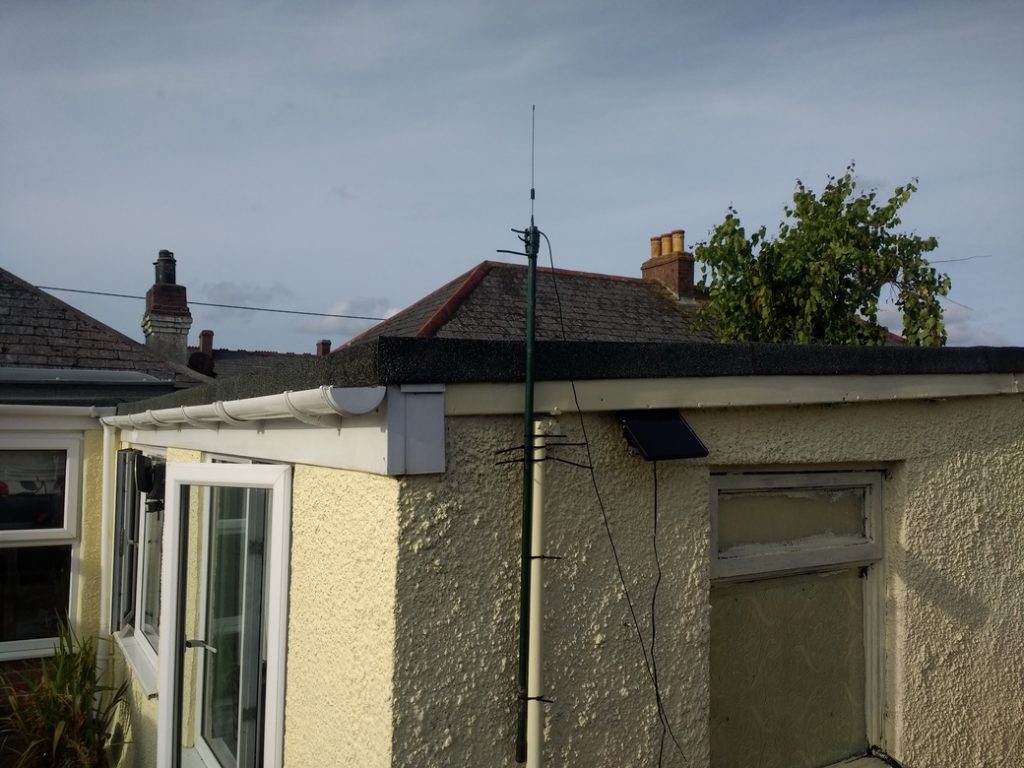
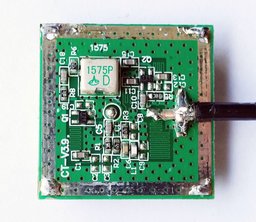
Found out from www.rtl-sdr.com that the GPS ceramic antenna on the module are cap filtered (or not) to within 2MHz of GPS 1575 MHz freq and the module powers the appropriate active antennas, so a normal SDR aerial wont do! - :
So how is the pressure difference per meter working out?
I plotted 0m, 1m, 3m, 10m, 30m, 84m (me), and 100m ALTITUDE and loaded the program where 0m gives the bmp180 absolute pressure it is reading NOW, given those heights.
For figures at 25.7C:
0m - 1016.54 mb
1m - 1016.66 mb
3m - 1016.90 mb
10 m - 1017.77 mb
30m - 1020.18 mb
60m - 1023.89 mb
84m (me) - mb
100m - 1028.74 mb
This gives about 1028.74-1016.54 = 12.2 mb/100m or 0.122mb/m change in pressure with height.
For more accuracy you would use more decimals obviously, but a good rule of thumb = 0.1225/m.
It's estimate of Relative Sea Pressure today then gives 1026.7 mb, and Perran Stn says:
| Outside Temperature | 19.3-°C |
| Wind Chill | 19.3-°C |
| Heat Index | 19.3-°C |
| Dewpoint | 16.2-°C |
| Humidity | 82% |
| Barometer | 1025.5 mbar |
| Barometer Trend (3 hours) | 0.1 mbar |
| Wind | 1 mph from 255-° (WSW) |
| Rain Rate | 0.0 mm/hr |
| Inside Temperature | 22.8-°C |
| ET | 0.0 mm |
| Solar Radiation | 102 W/m-² |
Latitude: 50-° 20.25' N
Longitude: 005-° 09.53' W
Altitude: 20 meters
----------------------
Subtract 20 x 0.1225 = 2.45 would make their sea level about- 1025.5 + 2.45 = 1027.95.
A difference of only my 1026.7 RelSeaP to their RelSeaP cal'd of 1027.95 - 1026.7 =- 1.25mb so about +/- 10m out depending on how accurate their elevation is stated and there is a 25-19C temp diff also..Weather can be very different too, 12 miles away. This is micro-climate Cornwall...!
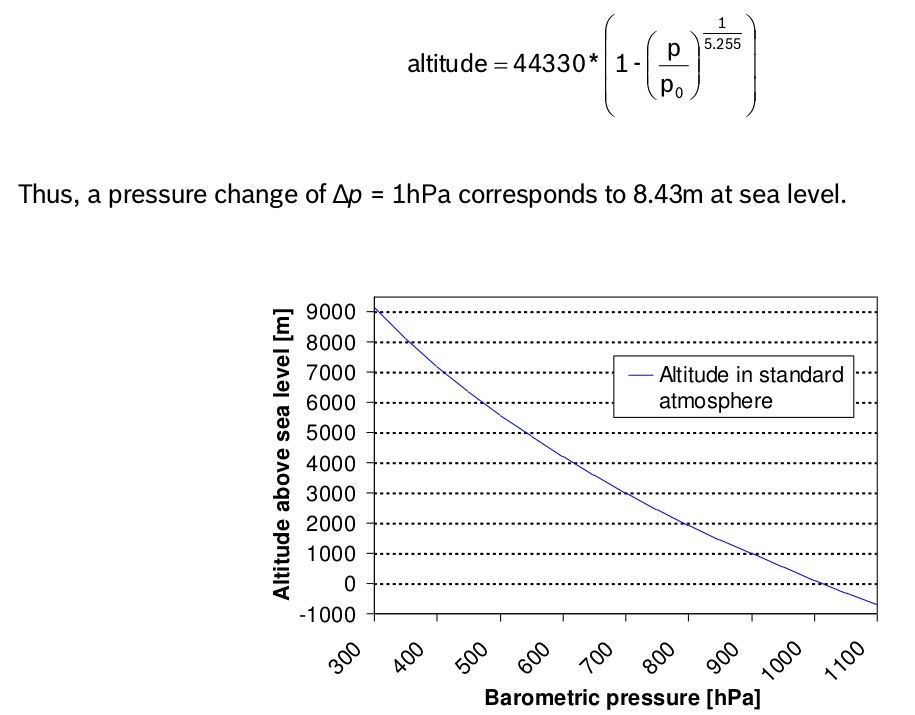
So it's clear what the complex log calc in the bmp180 datasheet, so the library, has to cater for, if you input alt in meters to your bmp180 and read it's relative sea level pressure, then plot in Excel/Calc etc.:
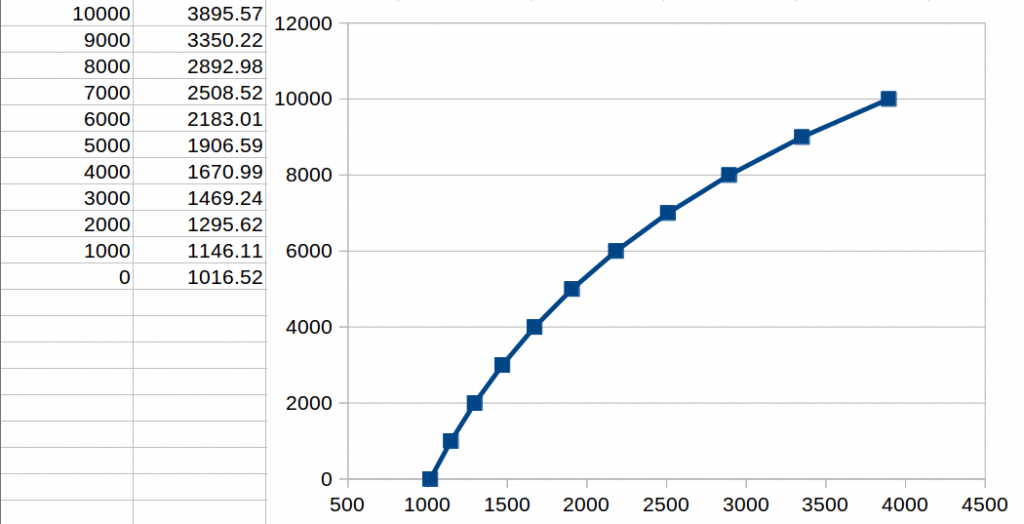
Datasheet plot
To read the serial data from the IDE loaded prog in your linux term:
socat stdio /dev/ttyUSB0