https://stevepedwards.today/learn.sparkfun.com/tutorials/gps-logger-shield-hookup-guide/example-sketch-tinygps-serial-streaming
https://www.gpsinformation.org/dale/nmea.htm
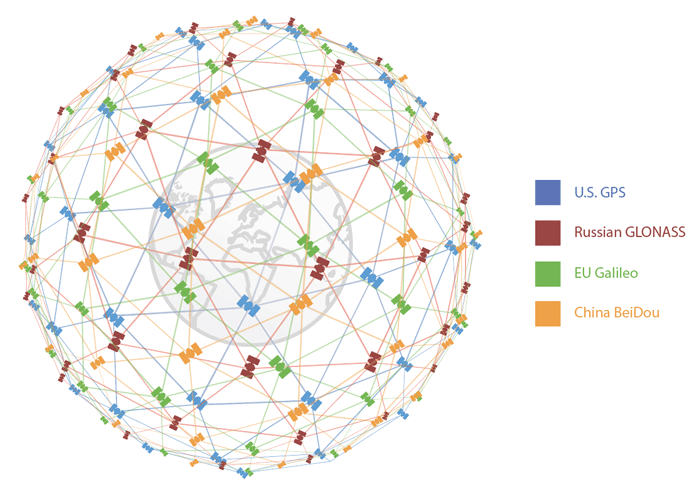
https://www.sparkfun.com/gps
Build a gps time referenced clock
https://stevepedwards.today/learn.sparkfun.com/tutorials/alphanumeric-gps-wall-clock
TinyGPSPlus_GPS_Shield.ino
/******************************************************************************
  TinyGPSPlus_GPS_Shield.ino
  TinyGPS++ Library Example for the SparkFun GPS Logger Shield
  By Jim Lindblom @ SparkFun Electronics
  February 9, 2016
  https://stevepedwards.today/github.com/sparkfun/GPS_Shield
  This example uses SoftwareSerial to communicate with the GPS module on
  pins 8 and 9. It uses the TinyGPS++ library to parse the NMEA strings sent
  by the GPS module, and prints interesting GPS information to the serial
  monitor.
  After uploading the code, open your serial monitor, set it to 9600 baud, and
  watch for latitude, longitude, altitude, course, speed, date, time, and the
  number of visible satellites.
  Resources:
  TinyGPS++ Library  - https://stevepedwards.today/github.com/mikalhart/TinyGPSPlus/releases
  SoftwareSerial Library
  Development/hardware environment specifics:
  Arduino IDE 1.6.7
  GPS Logger Shield v2.0 - Make sure the UART switch is set to SW-UART
  Arduino Uno, RedBoard, Pro, etc.
******************************************************************************/
#include <TinyGPS++.h> // Include the TinyGPS++ library
TinyGPSPlus tinyGPS; // Create a TinyGPSPlus object
#include <LiquidCrystal.h>
LiquidCrystal lcd(12, 11, 5, 4, 3, 2);
#define GPS_BAUD 9600 // GPS module baud rate. GP3906 defaults to 9600.
// If you're using an Arduino Uno, RedBoard, or any board that uses the
// 0/1 UART for programming/Serial monitor-ing, use SoftwareSerial:
#include <SoftwareSerial.h>
#define ARDUINO_GPS_RX 9 // GPS TX, Arduino RX pin
#define ARDUINO_GPS_TX 8 // GPS RX, Arduino TX pin
SoftwareSerial ssGPS(ARDUINO_GPS_TX, ARDUINO_GPS_RX); // Create a SoftwareSerial
// Set gpsPort to either ssGPS if using SoftwareSerial or Serial1 if using an
// Arduino with a dedicated hardware serial port
#define gpsPort ssGPS  // Alternatively, use Serial1 on the Leonardo
// Define the serial monitor port. On the Uno, and Leonardo this is 'Serial'
//  on other boards this may be 'SerialUSB'
#define SerialMonitor Serial
void setup()
{
  SerialMonitor.begin(9600);
  gpsPort.begin(GPS_BAUD);
}
void loop()
{
  // print position, altitude, speed, time/date, and satellites:
  printGPSInfo();
  // "Smart delay" looks for GPS data while the Arduino's not doing anything else
  smartDelay(1000);
}
void printGPSInfo()
{
  // Print latitude, longitude, altitude in feet, course, speed, date, time,
  // and the number of visible satellites.
  SerialMonitor.print("Lat: "); SerialMonitor.println(tinyGPS.location.lat(), 6);
  SerialMonitor.print("Long: "); SerialMonitor.println(tinyGPS.location.lng(), 6);
  SerialMonitor.print("Alt: "); SerialMonitor.println(tinyGPS.altitude.feet());
  SerialMonitor.print("Course: "); SerialMonitor.println(tinyGPS.course.deg());
  SerialMonitor.print("Speed: "); SerialMonitor.println(tinyGPS.speed.mph());
  SerialMonitor.print("Date: "); printDate();
  SerialMonitor.print("Time: "); printTime();
  SerialMonitor.print("Sats: "); SerialMonitor.println(tinyGPS.satellites.value());
  SerialMonitor.println();
}
// This custom version of delay() ensures that the tinyGPS object
// is being "fed". From the TinyGPS++ examples.
static void smartDelay(unsigned long ms)
{
  unsigned long start = millis();
  do
  {
    // If data has come in from the GPS module
    while (gpsPort.available())
      tinyGPS.encode(gpsPort.read()); // Send it to the encode function
    // tinyGPS.encode(char) continues to "load" the tinGPS object with new
    // data coming in from the GPS module. As full NMEA strings begin to come in
    // the tinyGPS library will be able to start parsing them for pertinent info
  } while (millis() - start < ms);
}
// printDate() formats the date into dd/mm/yy.
void printDate()
{
  SerialMonitor.print(tinyGPS.date.day());
  SerialMonitor.print("/");
  SerialMonitor.print(tinyGPS.date.month());
  SerialMonitor.print("/");
  SerialMonitor.println(tinyGPS.date.year());
}
// printTime() formats the time into "hh:mm:ss", and prints leading 0's
// where they're called for.
void printTime()
{
  SerialMonitor.print(tinyGPS.time.hour());
  SerialMonitor.print(":");
  if (tinyGPS.time.minute() < 10) SerialMonitor.print('0');
  SerialMonitor.print(tinyGPS.time.minute());
  SerialMonitor.print(":");
  if (tinyGPS.time.second() < 10) SerialMonitor.print('0');
  SerialMonitor.println(tinyGPS.time.second());
}
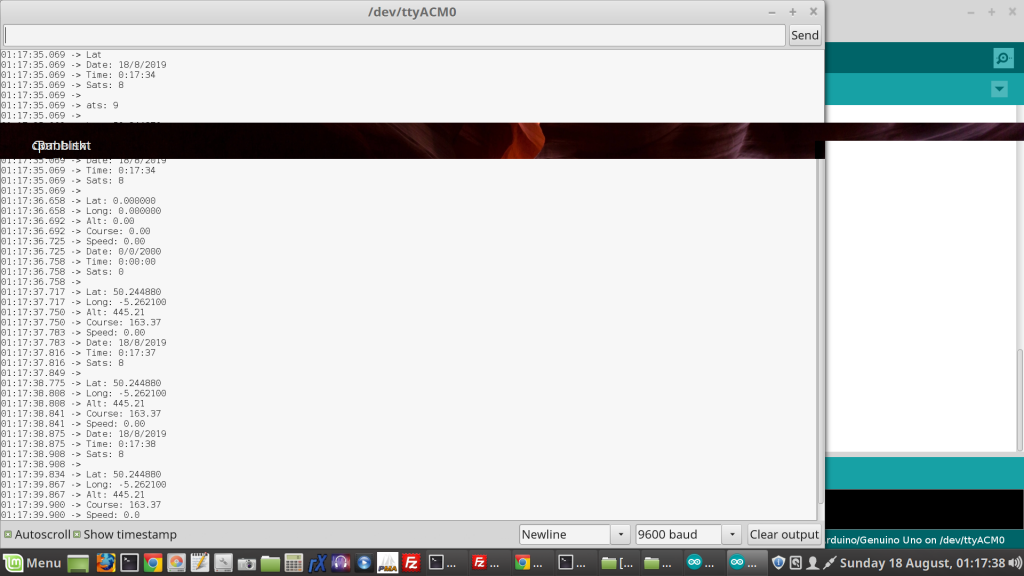
01:18:08.580 -> Lat: 50.244876
01:18:08.580 -> Long: -5.262097
01:18:08.613 -> Alt: 444.55 ?? correct?
01:18:08.613 -> Course: 163.37 ??? who's course?
01:18:08.646 -> Speed: 0.00
01:18:08.646 -> Date: 18/8/2019
01:18:08.679 -> Time: 0:18:08
01:18:08.679 -> Sats: 8
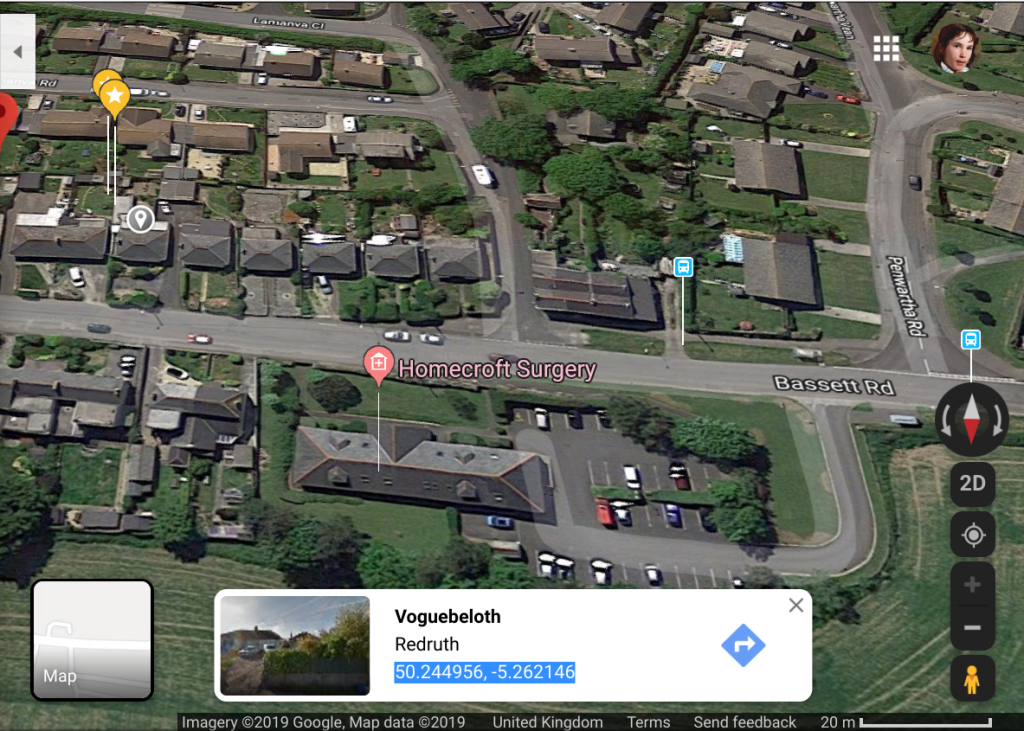
I'm assuming all the units are Imperial due to US system in feet, so showing my elevation at 444ft, or 135m - way off according to my phone app, which puts me at 84m ASL...? I'm also flying along on a course of 163.37 whatever that means..
My lat/long is correct to my phone/google maps at 50.244956, -5.262146:
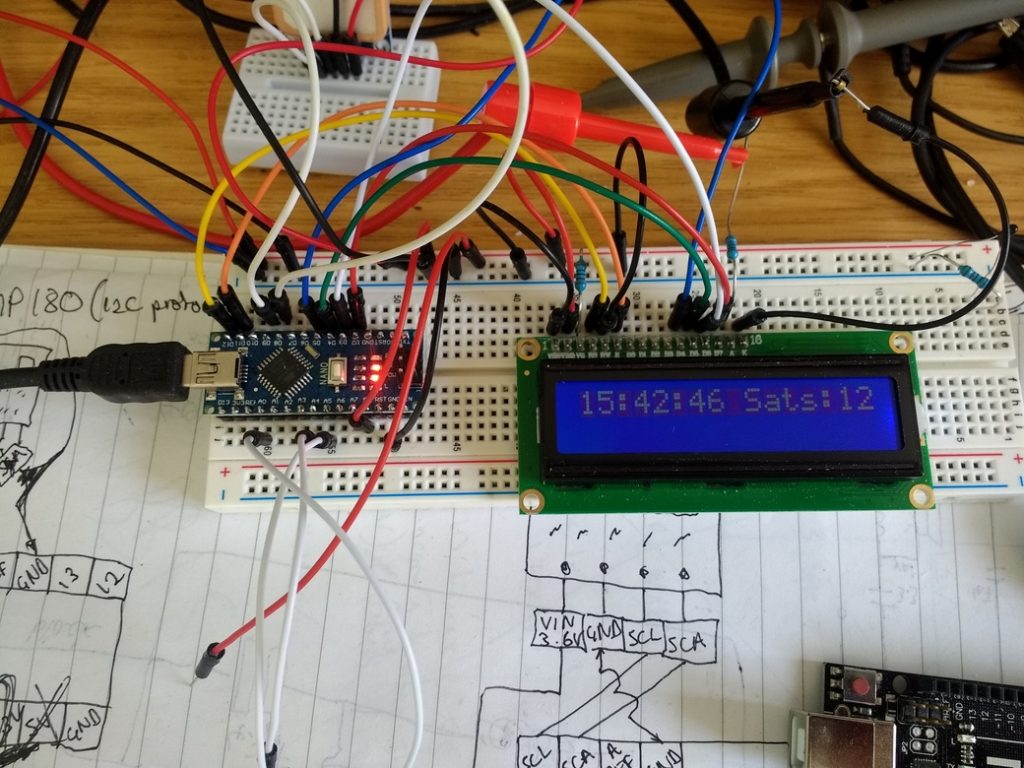
Amended to show clock time and no. Sats (SVs - Sats in View) in LCD below
------------------
/******************************************************************************
  TinyGPSPlus_GPS_Shield.ino
  TinyGPS++ Library Example for the SparkFun GPS Logger Shield
  By Jim Lindblom @ SparkFun Electronics
  February 9, 2016
  https://stevepedwards.today/github.com/sparkfun/GPS_Shield
  This example uses SoftwareSerial to communicate with the GPS module on
  pins 8 and 9. It uses the TinyGPS++ library to parse the NMEA strings sent
  by the GPS module, and prints interesting GPS information to the serial
  monitor.
  After uploading the code, open your serial monitor, set it to 9600 baud, and
  watch for latitude, longitude, altitude, course, speed, date, time, and the
  number of visible satellites.
  Resources:
  TinyGPS++ Library  - https://stevepedwards.today/github.com/mikalhart/TinyGPSPlus/releases
  SoftwareSerial Library
  Development/hardware environment specifics:
  Arduino IDE 1.6.7
  GPS Logger Shield v2.0 - Make sure the UART switch is set to SW-UART
  Arduino Uno, RedBoard, Pro, etc.
******************************************************************************/
#include <TinyGPS++.h> // Include the TinyGPS++ library
TinyGPSPlus tinyGPS; // Create a TinyGPSPlus object
#include <LiquidCrystal.h>
LiquidCrystal lcd(12, 11, 5, 4, 3, 2);
#define GPS_BAUD 9600 // GPS module baud rate. GP3906 defaults to 9600.
// If you're using an Arduino Uno, RedBoard, or any board that uses the
// 0/1 UART for programming/Serial monitor-ing, use SoftwareSerial:
#include <SoftwareSerial.h>
#define ARDUINO_GPS_RX 9 // GPS TX, Arduino RX pin
#define ARDUINO_GPS_TX 8 // GPS RX, Arduino TX pin
SoftwareSerial ssGPS(ARDUINO_GPS_TX, ARDUINO_GPS_RX); // Create a SoftwareSerial
// Set gpsPort to either ssGPS if using SoftwareSerial or Serial1 if using an
// Arduino with a dedicated hardware serial port
#define gpsPort ssGPS  // Alternatively, use Serial1 on the Leonardo
// Define the serial monitor port. On the Uno, and Leonardo this is 'Serial'
//  on other boards this may be 'SerialUSB'
#define SerialMonitor Serial
void setup()
{
  SerialMonitor.begin(9600);
  gpsPort.begin(GPS_BAUD);
}
void loop()
{
  // print position, altitude, speed, time/date, and satellites:
  printGPSInfo();
  // "Smart delay" looks for GPS data while the Arduino's not doing anything else
  smartDelay(1000);
}
void printGPSInfo()
{
  // Print latitude, longitude, altitude in feet, course, speed, date, time,
  // and the number of visible satellites.
  SerialMonitor.print("Lat: "); SerialMonitor.println(tinyGPS.location.lat(), 6);
  SerialMonitor.print("Long: "); SerialMonitor.println(tinyGPS.location.lng(), 6);
  SerialMonitor.print("Alt: "); SerialMonitor.println(tinyGPS.altitude.feet());
  SerialMonitor.print("Course: "); SerialMonitor.println(tinyGPS.course.deg());
  SerialMonitor.print("Speed: "); SerialMonitor.println(tinyGPS.speed.mph());
  SerialMonitor.print("Date: "); printDate();
  SerialMonitor.print("Time: "); printTime();
  SerialMonitor.print("Sats: "); SerialMonitor.println(tinyGPS.satellites.value());
  SerialMonitor.println();
}
// This custom version of delay() ensures that the tinyGPS object
// is being "fed". From the TinyGPS++ examples.
static void smartDelay(unsigned long ms)
{
  unsigned long start = millis();
  do
  {
    // If data has come in from the GPS module
    while (gpsPort.available())
      tinyGPS.encode(gpsPort.read()); // Send it to the encode function
    // tinyGPS.encode(char) continues to "load" the tinGPS object with new
    // data coming in from the GPS module. As full NMEA strings begin to come in
    // the tinyGPS library will be able to start parsing them for pertinent info
  } while (millis() - start < ms);
}
// printDate() formats the date into dd/mm/yy.
void printDate()
{
  SerialMonitor.print(tinyGPS.date.day());
  SerialMonitor.print("/");
  SerialMonitor.print(tinyGPS.date.month());
  SerialMonitor.print("/");
  SerialMonitor.println(tinyGPS.date.year());
}
// printTime() formats the time into "hh:mm:ss", and prints leading 0's
// where they're called for.
void printTime()
{
  SerialMonitor.print(tinyGPS.time.hour());
  SerialMonitor.print(":");
  if (tinyGPS.time.minute() < 10) SerialMonitor.print('0');
  SerialMonitor.print(tinyGPS.time.minute());
  SerialMonitor.print(":");
  if (tinyGPS.time.second() < 10) SerialMonitor.print('0');
  SerialMonitor.println(tinyGPS.time.second());
lcd.clear();
lcd.print(tinyGPS.time.hour());
lcd.print(":");
if (tinyGPS.time.minute() < 10) lcd.print('0');
lcd.print(tinyGPS.time.minute());
lcd.print(":");
if (tinyGPS.time.second() < 10) lcd.print('0');
lcd.print(tinyGPS.time.second());
lcd.print(" Sats:"); lcd.print(tinyGPS.satellites.value());
delay(1000);
}
Note extra 4.5V PSU to power LCD to not strain Nano.
Code with Time, Sats, Lat, Long:
/******************************************************************************
  TinyGPSPlus_GPS_Shield.ino
  TinyGPS++ Library Example for the SparkFun GPS Logger Shield
  By Jim Lindblom @ SparkFun Electronics
  February 9, 2016
  https://stevepedwards.today/github.com/sparkfun/GPS_Shield
  This example uses SoftwareSerial to communicate with the GPS module on
  pins 8 and 9. It uses the TinyGPS++ library to parse the NMEA strings sent
  by the GPS module, and prints interesting GPS information to the serial
  monitor.
  After uploading the code, open your serial monitor, set it to 9600 baud, and
  watch for latitude, longitude, altitude, course, speed, date, time, and the
  number of visible satellites.
  Resources:
  TinyGPS++ Library  - https://stevepedwards.today/github.com/mikalhart/TinyGPSPlus/releases
  SoftwareSerial Library
  Development/hardware environment specifics:
  Arduino IDE 1.6.7
  GPS Logger Shield v2.0 - Make sure the UART switch is set to SW-UART
  Arduino Uno, RedBoard, Pro, etc.
******************************************************************************/
#include <TinyGPS++.h> // Include the TinyGPS++ library
TinyGPSPlus tinyGPS; // Create a TinyGPSPlus object
#include <LiquidCrystal.h>
LiquidCrystal lcd(12, 11, 5, 4, 3, 2);
#define GPS_BAUD 9600 // GPS module baud rate. GP3906 defaults to 9600.
// If you're using an Arduino Uno, RedBoard, or any board that uses the
// 0/1 UART for programming/Serial monitor-ing, use SoftwareSerial:
#include <SoftwareSerial.h>
#define ARDUINO_GPS_RX 9 // GPS TX, Arduino RX pin
#define ARDUINO_GPS_TX 8 // GPS RX, Arduino TX pin
SoftwareSerial ssGPS(ARDUINO_GPS_TX, ARDUINO_GPS_RX); // Create a SoftwareSerial
// Set gpsPort to either ssGPS if using SoftwareSerial or Serial1 if using an
// Arduino with a dedicated hardware serial port
#define gpsPort ssGPS  // Alternatively, use Serial1 on the Leonardo
// Define the serial monitor port. On the Uno, and Leonardo this is 'Serial'
//  on other boards this may be 'SerialUSB'
#define SerialMonitor Serial
void setup()
{
  SerialMonitor.begin(9600);
  gpsPort.begin(GPS_BAUD);
  lcd.begin(16,2);
  lcd.clear();
}
void loop()
{
  // print position, altitude, speed, time/date, and satellites:
  printGPSInfo();
  // "Smart delay" looks for GPS data while the Arduino's not doing anything else
  smartDelay(1000);
}
void printGPSInfo()
{
  // Print latitude, longitude, altitude in feet, course, speed, date, time,
  // and the number of visible satellites.
  SerialMonitor.print("Lat: "); SerialMonitor.println(tinyGPS.location.lat(), 6);
  SerialMonitor.print("Long: "); SerialMonitor.println(tinyGPS.location.lng(), 6);
  SerialMonitor.print("Alt: "); SerialMonitor.println(tinyGPS.altitude.feet());
  SerialMonitor.print("Course: "); SerialMonitor.println(tinyGPS.course.deg());
  SerialMonitor.print("Speed: "); SerialMonitor.println(tinyGPS.speed.mph());
  SerialMonitor.print("Date: "); printDate();
  SerialMonitor.print("Time: "); printTime();
  SerialMonitor.print("Sats: "); SerialMonitor.println(tinyGPS.satellites.value());
  SerialMonitor.println();
}
// This custom version of delay() ensures that the tinyGPS object
// is being "fed". From the TinyGPS++ examples.
static void smartDelay(unsigned long ms)
{
  unsigned long start = millis();
  do
  {
    // If data has come in from the GPS module
    while (gpsPort.available())
      tinyGPS.encode(gpsPort.read()); // Send it to the encode function
    // tinyGPS.encode(char) continues to "load" the tinGPS object with new
    // data coming in from the GPS module. As full NMEA strings begin to come in
    // the tinyGPS library will be able to start parsing them for pertinent info
  } while (millis() - start < ms);
}
// printDate() formats the date into dd/mm/yy.
void printDate()
{
  SerialMonitor.print(tinyGPS.date.day());
  SerialMonitor.print("/");
  SerialMonitor.print(tinyGPS.date.month());
  SerialMonitor.print("/");
  SerialMonitor.println(tinyGPS.date.year());
}
// printTime() formats the time into "hh:mm:ss", and prints leading 0's
// where they're called for.
void printTime()
{
  SerialMonitor.print(tinyGPS.time.hour());
  SerialMonitor.print(":");
  if (tinyGPS.time.minute() < 10) SerialMonitor.print('0');
  SerialMonitor.print(tinyGPS.time.minute());
  SerialMonitor.print(":");
  if (tinyGPS.time.second() < 10) SerialMonitor.print('0');
  SerialMonitor.println(tinyGPS.time.second());
  lcd.setCursor(0,0);
  lcd.print(tinyGPS.time.hour());
  lcd.print(":");
  if (tinyGPS.time.minute() < 10) lcd.print('0');
  lcd.print(tinyGPS.time.minute());
  lcd.print(":");
  if (tinyGPS.time.second() < 10) lcd.print('0');
  lcd.print(tinyGPS.time.second());
  lcd.print(" Sats:"); lcd.print(tinyGPS.satellites.value());
  lcd.setCursor(0,1);
  lcd.print("Lt:"); lcd.print(tinyGPS.location.lat(), 1);
  lcd.print(" Lg:"); lcd.print(tinyGPS.location.lng(), 2);
}
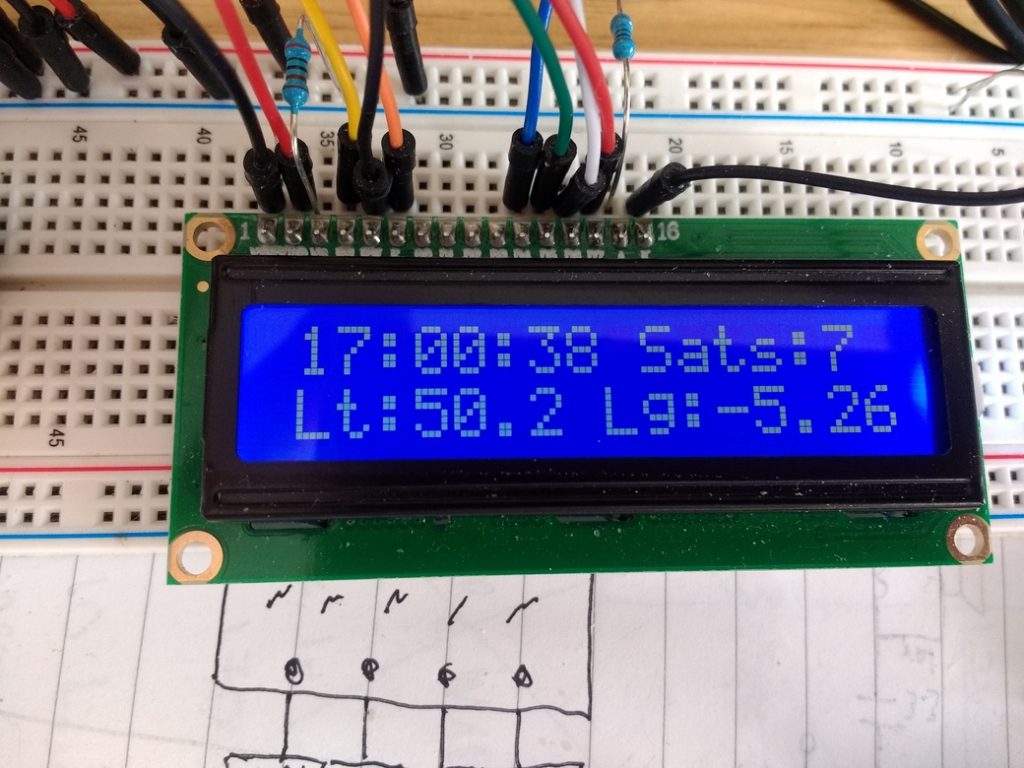
Added a height conversion and delays between 2 screen data sets to show Alt in feet and meters as well. Now has 6 data sets in 4 lines of LCD:
/******************************************************************************
  TinyGPSPlus_GPS_Shield.ino
  TinyGPS++ Library Example for the SparkFun GPS Logger Shield
  By Jim Lindblom @ SparkFun Electronics
  February 9, 2016
  https://stevepedwards.today/github.com/sparkfun/GPS_Shield
  This example uses SoftwareSerial to communicate with the GPS module on
  pins 8 and 9. It uses the TinyGPS++ library to parse the NMEA strings sent
  by the GPS module, and prints interesting GPS information to the serial
  monitor.
  After uploading the code, open your serial monitor, set it to 9600 baud, and
  watch for latitude, longitude, altitude, course, speed, date, time, and the
  number of visible satellites.
  Resources:
  TinyGPS++ Library  - https://stevepedwards.today/github.com/mikalhart/TinyGPSPlus/releases
  SoftwareSerial Library
  Development/hardware environment specifics:
  Arduino IDE 1.6.7
  GPS Logger Shield v2.0 - Make sure the UART switch is set to SW-UART
  Arduino Uno, RedBoard, Pro, etc.
******************************************************************************/
#include <TinyGPS++.h> // Include the TinyGPS++ library
TinyGPSPlus tinyGPS; // Create a TinyGPSPlus object
#include <LiquidCrystal.h>
LiquidCrystal lcd(12, 11, 5, 4, 3, 2);
#define GPS_BAUD 9600 // GPS module baud rate. GP3906 defaults to 9600.
// If you're using an Arduino Uno, RedBoard, or any board that uses the
// 0/1 UART for programming/Serial monitor-ing, use SoftwareSerial:
#include <SoftwareSerial.h>
#define ARDUINO_GPS_RX 9 // GPS TX, Arduino RX pin
#define ARDUINO_GPS_TX 8 // GPS RX, Arduino TX pin
SoftwareSerial ssGPS(ARDUINO_GPS_TX, ARDUINO_GPS_RX); // Create a SoftwareSerial
// Set gpsPort to either ssGPS if using SoftwareSerial or Serial1 if using an
// Arduino with a dedicated hardware serial port
#define gpsPort ssGPS  // Alternatively, use Serial1 on the Leonardo
// Define the serial monitor port. On the Uno, and Leonardo this is 'Serial'
//  on other boards this may be 'SerialUSB'
#define SerialMonitor Serial
void setup()
{
  SerialMonitor.begin(9600);
  gpsPort.begin(GPS_BAUD);
  lcd.begin(16,2);
  lcd.clear();
}
void loop()
{
  // print position, altitude, speed, time/date, and satellites:
  printGPSInfo();
  // "Smart delay" looks for GPS data while the Arduino's not doing anything else
  smartDelay(1000);
}
void printGPSInfo()
{
  // Print latitude, longitude, altitude in feet, course, speed, date, time,
  // and the number of visible satellites.
  SerialMonitor.print("Lat: "); SerialMonitor.println(tinyGPS.location.lat(), 6);
  SerialMonitor.print("Long: "); SerialMonitor.println(tinyGPS.location.lng(), 6);
  SerialMonitor.print("Alt: "); SerialMonitor.println(tinyGPS.altitude.feet());
  SerialMonitor.print("Course: "); SerialMonitor.println(tinyGPS.course.deg());
  SerialMonitor.print("Speed: "); SerialMonitor.println(tinyGPS.speed.mph());
  SerialMonitor.print("Date: "); printDate();
  SerialMonitor.print("Time: "); printTime();
  SerialMonitor.print("Sats: "); SerialMonitor.println(tinyGPS.satellites.value());
  SerialMonitor.println();
  lcd.clear();
  lcd.setCursor(0,0);
  lcd.print("Alt: "); lcd.print(tinyGPS.altitude.feet()); lcd.print(" ft");
  //convert feet to meters
  int m = (tinyGPS.altitude.feet())/ 3.28084;
  lcd.setCursor(0,1);
  lcd.print("Alt: "); lcd.print(m); lcd.print(" meters");
  delay(5000);
}
// This custom version of delay() ensures that the tinyGPS object
// is being "fed". From the TinyGPS++ examples.
static void smartDelay(unsigned long ms)
{
  unsigned long start = millis();
  do
  {
    // If data has come in from the GPS module
    while (gpsPort.available())
      tinyGPS.encode(gpsPort.read()); // Send it to the encode function
    // tinyGPS.encode(char) continues to "load" the tinyGPS object with new
    // data coming in from the GPS module. As full NMEA strings begin to come in
    // the tinyGPS library will be able to start parsing them for pertinent info
  } while (millis() - start < ms);
}
// printDate() formats the date into dd/mm/yy.
void printDate()
{
  SerialMonitor.print(tinyGPS.date.day());
  SerialMonitor.print("/");
  SerialMonitor.print(tinyGPS.date.month());
  SerialMonitor.print("/");
  SerialMonitor.println(tinyGPS.date.year());
}
// printTime() formats the time into "hh:mm:ss", and prints leading 0's
// where they're called for.
void printTime()
{
  SerialMonitor.print(tinyGPS.time.hour());
  SerialMonitor.print(":");
  if (tinyGPS.time.minute() < 10) SerialMonitor.print('0');
  SerialMonitor.print(tinyGPS.time.minute());
  SerialMonitor.print(":");
  if (tinyGPS.time.second() < 10) SerialMonitor.print('0');
  SerialMonitor.println(tinyGPS.time.second());
  lcd.setCursor(0,0);
  lcd.print(tinyGPS.time.hour());
  lcd.print(":");
  if (tinyGPS.time.minute() < 10) lcd.print('0');
  lcd.print(tinyGPS.time.minute());
  lcd.print(":");
  if (tinyGPS.time.second() < 10) lcd.print('0');
  lcd.print(tinyGPS.time.second());
  lcd.print(" Sats:"); lcd.print(tinyGPS.satellites.value());
  lcd.setCursor(0,1);
  lcd.print("Lt:"); lcd.print(tinyGPS.location.lat(), 1);
  lcd.print(" Lg:"); lcd.print(tinyGPS.location.lng(), 2);
  delay(5000);
}
Added 3 screen, 5 sec- views, 2 line- sections showing added BST = GMT+1:
/******************************************************************************
  TinyGPSPlus_GPS_Shield.ino
  TinyGPS++ Library Example for the SparkFun GPS Logger Shield
  By Jim Lindblom @ SparkFun Electronics
  February 9, 2016
  https://stevepedwards.today/github.com/sparkfun/GPS_Shield
  This example uses SoftwareSerial to communicate with the GPS module on
  pins 8 and 9. It uses the TinyGPS++ library to parse the NMEA strings sent
  by the GPS module, and prints interesting GPS information to the serial
  monitor.
  After uploading the code, open your serial monitor, set it to 9600 baud, and
  watch for latitude, longitude, altitude, course, speed, date, time, and the
  number of visible satellites.
  Resources:
  TinyGPS++ Library  - https://stevepedwards.today/github.com/mikalhart/TinyGPSPlus/releases
  SoftwareSerial Library
  Development/hardware environment specifics:
  Arduino IDE 1.6.7
  GPS Logger Shield v2.0 - Make sure the UART switch is set to SW-UART
  Arduino Uno, RedBoard, Pro, etc.
******************************************************************************/
#include <TinyGPS++.h> // Include the TinyGPS++ library
TinyGPSPlus tinyGPS; // Create a TinyGPSPlus object
#include <LiquidCrystal.h>
LiquidCrystal lcd(12, 11, 5, 4, 3, 2);
#define GPS_BAUD 9600 // GPS module baud rate. GP3906 defaults to 9600.
// If you're using an Arduino Uno, RedBoard, or any board that uses the
// 0/1 UART for programming/Serial monitor-ing, use SoftwareSerial:
#include <SoftwareSerial.h>
#define ARDUINO_GPS_RX 9 // GPS TX, Arduino RX pin
#define ARDUINO_GPS_TX 8 // GPS RX, Arduino TX pin
SoftwareSerial ssGPS(ARDUINO_GPS_TX, ARDUINO_GPS_RX); // Create a SoftwareSerial
// Set gpsPort to either ssGPS if using SoftwareSerial or Serial1 if using an
// Arduino with a dedicated hardware serial port
#define gpsPort ssGPS  // Alternatively, use Serial1 on the Leonardo
// Define the serial monitor port. On the Uno, and Leonardo this is 'Serial'
//  on other boards this may be 'SerialUSB'
#define SerialMonitor Serial
void setup()
{
  SerialMonitor.begin(9600);
  gpsPort.begin(GPS_BAUD);
  lcd.begin(16,2);
  lcd.clear();
}
void loop()
{
  // print position, altitude, speed, time/date, and satellites:
  printGPSInfo();
  // "Smart delay" looks for GPS data while the Arduino's not doing anything else
  smartDelay(1000);
}
void printGPSInfo()
{
  // Print latitude, longitude, altitude in feet, course, speed, date, time,
  // and the number of visible satellites.
  SerialMonitor.print("Lat: "); SerialMonitor.println(tinyGPS.location.lat(), 6);
  SerialMonitor.print("Long: "); SerialMonitor.println(tinyGPS.location.lng(), 6);
  SerialMonitor.print("Alt: "); SerialMonitor.println(tinyGPS.altitude.feet());
  SerialMonitor.print("Course: "); SerialMonitor.println(tinyGPS.course.deg());
  SerialMonitor.print("Speed: "); SerialMonitor.println(tinyGPS.speed.mph());
  SerialMonitor.print("Date: "); printDate();
  SerialMonitor.print("Time: "); printTime();
  SerialMonitor.print("Sats: "); SerialMonitor.println(tinyGPS.satellites.value());
  SerialMonitor.println();
  // LCD Clock Sats section
  lcd.clear();
  lcd.setCursor(0,0);
  lcd.print(tinyGPS.time.hour());
  lcd.print(":");
  if (tinyGPS.time.minute() < 10) lcd.print('0');
  lcd.print(tinyGPS.time.minute());
  lcd.print(":");
  if (tinyGPS.time.second() < 10) lcd.print('0');
  lcd.print(tinyGPS.time.second());
  lcd.print(" Sats:"); lcd.print(tinyGPS.satellites.value());
  lcd.setCursor(0,1);
  int BST = (tinyGPS.time.hour()) +1;
  lcd.print(BST);
  lcd.print(":");
  if (tinyGPS.time.minute() < 10) lcd.print('0');
  lcd.print(tinyGPS.time.minute());
  lcd.print(":");
  if (tinyGPS.time.second() < 10) lcd.print('0');
  lcd.print(tinyGPS.time.second());
  lcd.print(" BST");
  delay(5000);
  // LCD Location section
  lcd.clear();
  lcd.setCursor(0,0);
  lcd.print("Lat:  "); lcd.print(tinyGPS.location.lat(), 6);
  lcd.setCursor(0,1);
  lcd.print("Long: "); lcd.print(tinyGPS.location.lng(), 6);
  delay(5000);
  // LCD Alt section
  lcd.clear();
  lcd.setCursor(0,0);
  lcd.print("Alt: "); lcd.print(tinyGPS.altitude.feet()); lcd.print(" ft");
  //convert feet to meters
  int m = (tinyGPS.altitude.feet())/ 3.28084;
  lcd.setCursor(0,1);
  lcd.print("Alt: "); lcd.print(m); lcd.print(" meters");
  delay(5000);
}
// This custom version of delay() ensures that the tinyGPS object
// is being "fed". From the TinyGPS++ examples.
static void smartDelay(unsigned long ms)
{
  unsigned long start = millis();
  do
  {
    // If data has come in from the GPS module
    while (gpsPort.available())
      tinyGPS.encode(gpsPort.read()); // Send it to the encode function
    // tinyGPS.encode(char) continues to "load" the tinyGPS object with new
    // data coming in from the GPS module. As full NMEA strings begin to come in
    // the tinyGPS library will be able to start parsing them for pertinent info
  } while (millis() - start < ms);
}
// printDate() formats the date into dd/mm/yy.
void printDate()
{
  SerialMonitor.print(tinyGPS.date.day());
  SerialMonitor.print("/");
  SerialMonitor.print(tinyGPS.date.month());
  SerialMonitor.print("/");
  SerialMonitor.println(tinyGPS.date.year());
}
// printTime() formats the time into "hh:mm:ss", and prints leading 0's
// where they're called for.
void printTime()
{
  SerialMonitor.print(tinyGPS.time.hour());
  SerialMonitor.print(":");
  if (tinyGPS.time.minute() < 10) SerialMonitor.print('0');
  SerialMonitor.print(tinyGPS.time.minute());
  SerialMonitor.print(":");
  if (tinyGPS.time.second() < 10) SerialMonitor.print('0');
  SerialMonitor.println(tinyGPS.time.second());
}
Finally...? 7 data sets. Date was a runaround til I realised it had to be under the void printDate() function so order swapped with printTime() to show as required on LCD - vid below. Date, Sats, Time (BST), Lat, Long, Alt ft, Alt m.
/******************************************************************************
  TinyGPSPlus_GPS_Shield.ino
  TinyGPS++ Library Example for the SparkFun GPS Logger Shield
  By Jim Lindblom @ SparkFun Electronics
  February 9, 2016
  https://stevepedwards.today/github.com/sparkfun/GPS_Shield
  This example uses SoftwareSerial to communicate with the GPS module on
  pins 8 and 9. It uses the TinyGPS++ library to parse the NMEA strings sent
  by the GPS module, and prints interesting GPS information to the serial
  monitor.
  After uploading the code, open your serial monitor, set it to 9600 baud, and
  watch for latitude, longitude, altitude, course, speed, date, time, and the
  number of visible satellites.
  Resources:
  TinyGPS++ Library  - https://stevepedwards.today/github.com/mikalhart/TinyGPSPlus/releases
  SoftwareSerial Library
  Development/hardware environment specifics:
  Arduino IDE 1.6.7
  GPS Logger Shield v2.0 - Make sure the UART switch is set to SW-UART
  Arduino Uno, RedBoard, Pro, etc.
******************************************************************************/
#include <TinyGPS++.h> // Include the TinyGPS++ library
TinyGPSPlus tinyGPS; // Create a TinyGPSPlus object
#include <LiquidCrystal.h>
LiquidCrystal lcd(12, 11, 5, 4, 3, 2);
#define GPS_BAUD 9600 // GPS module baud rate. GP3906 defaults to 9600.
// If you're using an Arduino Uno, RedBoard, or any board that uses the
// 0/1 UART for programming/Serial monitor-ing, use SoftwareSerial:
#include <SoftwareSerial.h>
#define ARDUINO_GPS_RX 9 // GPS TX, Arduino RX pin
#define ARDUINO_GPS_TX 8 // GPS RX, Arduino TX pin
SoftwareSerial ssGPS(ARDUINO_GPS_TX, ARDUINO_GPS_RX); // Create a SoftwareSerial
// Set gpsPort to either ssGPS if using SoftwareSerial or Serial1 if using an
// Arduino with a dedicated hardware serial port
#define gpsPort ssGPS  // Alternatively, use Serial1 on the Leonardo
// Define the serial monitor port. On the Uno, and Leonardo this is 'Serial'
//  on other boards this may be 'SerialUSB'
#define SerialMonitor Serial
void setup()
{
  SerialMonitor.begin(9600);
  gpsPort.begin(GPS_BAUD);
  lcd.begin(16,2);
  lcd.clear();
}
void loop()
{
  // print position, altitude, speed, time/date, and satellites:
  printGPSInfo();
  // "Smart delay" looks for GPS data while the Arduino's not doing anything else
  smartDelay(1000);
}
void printGPSInfo()
{
  // Print latitude, longitude, altitude in feet, course, speed, date, time,
  // and the number of visible satellites.
  SerialMonitor.print("Lat: "); SerialMonitor.println(tinyGPS.location.lat(), 6);
  SerialMonitor.print("Long: "); SerialMonitor.println(tinyGPS.location.lng(), 6);
  SerialMonitor.print("Alt: "); SerialMonitor.println(tinyGPS.altitude.feet());
  SerialMonitor.print("Course: "); SerialMonitor.println(tinyGPS.course.deg());
  SerialMonitor.print("Speed: "); SerialMonitor.println(tinyGPS.speed.mph());
  SerialMonitor.print("Date: "); printDate();
  SerialMonitor.print("Time: "); printTime();
  SerialMonitor.print("Sats: "); SerialMonitor.println(tinyGPS.satellites.value());
  SerialMonitor.println();
  // LCD Location section
  lcd.clear();
  lcd.setCursor(0,0);
  lcd.print("Lat:  "); lcd.print(tinyGPS.location.lat(), 6);
  lcd.setCursor(0,1);
  lcd.print("Long: "); lcd.print(tinyGPS.location.lng(), 6);
  delay(5000);
  // LCD Alt section
  lcd.clear();
  lcd.setCursor(0,0);
  lcd.print("Alt: "); lcd.print(tinyGPS.altitude.feet()); lcd.print(" ft");
  //convert feet to meters
  int m = (tinyGPS.altitude.feet())/ 3.28084;
  lcd.setCursor(0,1);
  lcd.print("Alt: "); lcd.print(m); lcd.print(" meters");
  delay(5000);
}
// This custom version of delay() ensures that the tinyGPS object
// is being "fed". From the TinyGPS++ examples.
static void smartDelay(unsigned long ms)
{
  unsigned long start = millis();
  do
  {
    // If data has come in from the GPS module
    while (gpsPort.available())
      tinyGPS.encode(gpsPort.read()); // Send it to the encode function
    // tinyGPS.encode(char) continues to "load" the tinyGPS object with new
    // data coming in from the GPS module. As full NMEA strings begin to come in
    // the tinyGPS library will be able to start parsing them for pertinent info
  } while (millis() - start < ms);
}
// printDate() formats the date into dd/mm/yy.
void printDate()
{
  SerialMonitor.print(tinyGPS.date.day());
  SerialMonitor.print("/");
  SerialMonitor.print(tinyGPS.date.month());
  SerialMonitor.print("/");
  SerialMonitor.println(tinyGPS.date.year());
  lcd.clear();
  lcd.setCursor(0,0);
  lcd.print(tinyGPS.date.day());
  lcd.print("/");
  lcd.print(tinyGPS.date.month());
  lcd.print("/");
  lcd.print(tinyGPS.date.year());
  lcd.print(" Sats"); lcd.print(tinyGPS.satellites.value());
}
// printTime() formats the time into "hh:mm:ss", and prints leading 0's
// where they're called for.
void printTime()
{
  SerialMonitor.print(tinyGPS.time.hour());
  SerialMonitor.print(":");
  if (tinyGPS.time.minute() < 10) SerialMonitor.print('0');
  SerialMonitor.print(tinyGPS.time.minute());
  SerialMonitor.print(":");
  if (tinyGPS.time.second() < 10) SerialMonitor.print('0');
  SerialMonitor.println(tinyGPS.time.second());
  // LCD Clock Sats section
  //lcd.print(" Sats:"); lcd.print(tinyGPS.satellites.value());
  lcd.setCursor(0,1);
  int BST = (tinyGPS.time.hour()) +1;
  lcd.print(BST);
  lcd.print(":");
  if (tinyGPS.time.minute() < 10) lcd.print('0');
  lcd.print(tinyGPS.time.minute());
  lcd.print(":");
  if (tinyGPS.time.second() < 10) lcd.print('0');
  lcd.print(tinyGPS.time.second());
  lcd.print(" BST");
  delay(5000);
}