Admin 2008 -->
Admin 2008 -->
Admin 2008 -->
shell>aptitude install mysql-server-5.0
List all the available tools that come in this package once it has installed:
shell> mysql[TAB]
mysql mysqlimport
mysqlaccess mysql_install_db
mysqladmin mysqlmanager
mysqlanalyze mysqloptimize
mysqlbinlog mysqlrepair
mysqlbug mysqlreport
mysqlcheck mysql_secure_installation
mysql_client_test mysql_setpermission
mysql_client_test_embedded mysqlshow
mysql_convert_table_format mysql_tableinfo
mysqld mysqltest
mysqld_multi mysqltest_embedded
mysqld_safe mysqltestmanager
mysqldump mysqltestmanagerc
mysqldumpslow mysqltestmanager-pwgen
mysql_explain_log mysql_tzinfo_to_sql
mysql_find_rows mysql_upgrade
mysql_fix_extensions mysql_upgrade_shell
mysql_fix_privilege_tables mysql_waitpid
mysqlhotcopy mysql_zap
Read up on any of the above using the man command eg:
shell>man mysqlimport
First you need to prepare MYSQL itself by setting up general user access before choosing/creating a default database in which to create TABLES that contain Data Cells which will contain the DATA of specific TYPE you wish to store and manipulate, and create relations between etc. The DEBIAN MYSQL login access defaults are root and its pword.
shell> mysql -u root -ppassword
e.g:
mysql> GRANT ALL privileges ON *.* TO uname@localhost identified by 'pword';
mysql> CREATE DATABASE test ;
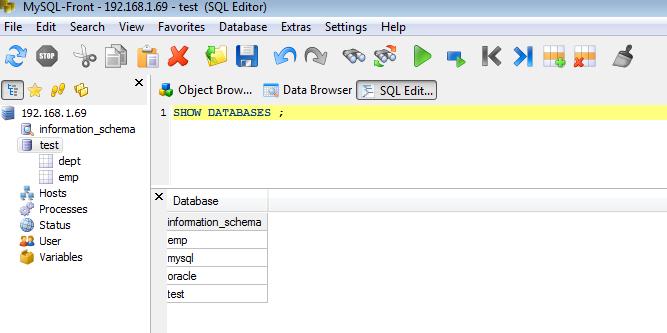
mysql> SHOW DATABASES ;
+--------------------+
| Database |
+--------------------+
| information_schema |
| emp |
| mysql |
| oracle |
| test |
+--------------------+
mysql> USE test ;
Database changed
mysql> CREATE TABLE dept (DEPTNO int, DEPT varchar(255), LOC varchar(255) ) ;
Query OK, 0 rows affected (0.01 sec)
mysql> SELECT * FROM dept ;
Empty set (0.00 sec)
to DELETE a TABLE entry:
mysql> DROP TABLE dept ;
Query OK, 0 rows affected (0.01 sec)
The Table data files named dept.txt and emp.txt must be created locally in /var/lib/mysql/test/.
Create these by pasting this data into two text files named dept.txt and emp.txt:
NOTE: The dept.txt field data is delimited by a SINGLE tab space for each field ONLY, so dont "tidy" it up!! There is no need for commas either as its a Tab Delimited file that works NOT a CSV, comma separated values file.
10 ACCOUNTS NEW YORK
20 RESEARCH DALLAS
30 SALES CHICAGO
40 OPERATIONS BOSTON
If not, CHICAGO will be input as NULL!
7369 SMITH CLERK 7902 17-DEC-80 800 0 20
7499 ALLEN SALESMAN 7698 20-FEB-81 1600 300 30
7521 WARD SALESMAN 7698 22-FEB-81 1250 500 30
7566 JONES MANAGER 7839 02-APR-81 2975 0 20
7654 MARTIN SALESMAN 7698 28-SEP-81 1250 1400 30
7698 BLAKE MANAGER 7839 01-MAY-81 2850 0 30
7782 CLARK MANAGER 7839 09-JUN-81 2450 0 10
7788 SCOTT ANALYST 7566 19-APR-87 3000 0 20
7839 KING PRESIDENT 0 17-NOV-81 5000 0 10
7844 TURNER SALESMAN 7698 08-SEP-81 1500 0 30
7876 ADAMS CLERK 7788 23-MAY-87 1100 0 20
7900 JAMES CLERK 7698 03-DEC-81 950 0 30
7902 FORD ANALYST 7566 03-DEC-81 3000 0 20
7934 MILLER CLERK 7782 23-JAN-82 1300 0 10
These files contains the "ordered" DATA to be imported into the TABLE CELLS of the TABLES in DataBase "test", named dept and emp, using the Linux cmd Line - not in the MYSQL shell!
shell># mysqlimport -u uname -p passwd test /var/lib/mysql/test/dept.txt
test.dept: Records: 4 Deleted: 0 Skipped: 0 Warnings: 1
shell># mysqlimport -u uname -ppasswd test /var/lib/mysql/test/emp.txt
test.emp: Records: 14 Deleted: 0 Skipped: 0 Warnings: 112
OK, now we can go back into MYSQL as above, then do some more to the DB
Careful! This DELETES ALL records!! Just so you know how:
mysql> DELETE FROM dept ;
Query OK, 8 rows affected (0.00 sec)
If you deleted them you have to go and import them again, as above
mysql> SELECT * FROM dept ;
+--------+------------+----------+
| DEPTNO | DEPT | LOC |
+--------+------------+----------+
| 10 | ACCOUNTS | NEW YORK |
| 20 | RESEARCH | DALLAS |
| 30 | SALES | CHICAGO |
| 40 | OPERATIONS | BOSTON |
+--------+------------+----------+
4 rows in set (0.00 sec)
Now do the same as before for Table emp putting the integer and string attribs in the correct columns.
mysql> CREATE TABLE emp (EMPNO int,ENAME varchar(255),JOB varchar(255),MGR int,HIREDATE varchar(255),SAL int,COMM int,DEPTNO int) ;
Query OK, 0 rows affected (0.01 sec)
Now back at the shell prompt on another screen, or log out of MYSQL with the "\q" command:
shell>mysqlimport -u uname -ppassword test /var/lib/mysql/test/emp.txt
That imports the data from emp.txt. Check the Table is correct back in mysql terminal as incorrect TABS will create NULL entries:
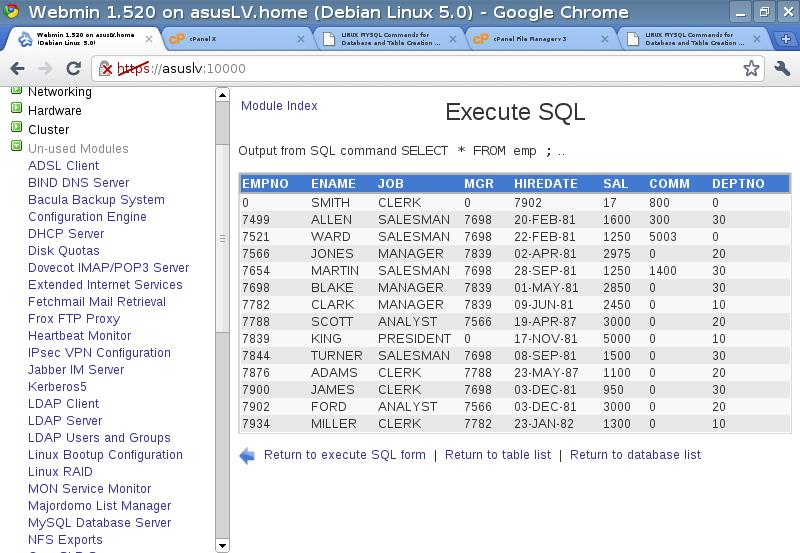
mysql> SELECT * FROM emp ;
+-------+--------+-----------+------+-----------+------+------+--------+
| EMPNO | ENAME | JOB | MGR | HIREDATE | SAL | COMM | DEPTNO |
+-------+--------+-----------+------+-----------+------+------+--------+
| 7369 | SMITH | CLERK | 7902 | 17-DEC-80 | 800 | 0 | 20 |
| 7499 | ALLEN | SALESMAN | 7698 | 20-FEB-81 | 1600 | 300 | 30 |
| 7521 | WARD | SALESMAN | 7698 | 22-FEB-81 | 1250 | 500 | 30 |
| 7566 | JONES | MANAGER | 7839 | 02-APR-81 | 2975 | 0 | 20 |
| 7654 | MARTIN | SALESMAN | 7698 | 28-SEP-81 | 1250 | 1400 | 30 |
| 7698 | BLAKE | MANAGER | 7839 | 01-MAY-81 | 2850 | 0 | 30 |
| 7782 | CLARK | MANAGER | 7839 | 09-JUN-81 | 2450 | 0 | 10 |
| 7788 | SCOTT | ANALYST | 7566 | 19-APR-87 | 3000 | 0 | 20 |
| 7839 | KING | PRESIDENT | 0 | 17-NOV-81 | 5000 | 0 | 10 |
| 7844 | TURNER | SALESMAN | 7698 | 08-SEP-81 | 1500 | 0 | 30 |
| 7876 | ADAMS | CLERK | 7788 | 23-MAY-87 | 1100 | 0 | 20 |
| 7900 | JAMES | CLERK | 7698 | 03-DEC-81 | 950 | 0 | 30 |
| 7902 | FORD | ANALYST | 7566 | 03-DEC-81 | 3000 | 0 | 20 |
| 7934 | MILLER | CLERK | 7782 | 23-JAN-82 | 1300 | 0 | 10 |
+-------+--------+-----------+------+-----------+------+------+--------+
14 rows in set (0.00 sec)
Create other users if you wish and give privileges as required once logged in to mysql. Note - to access the DB over a NET from a Winbox using MYSQL-Front etc. you need to create user privileges etc. from that pcs IP address eg:
mysql>CREATE USER steve@192.168.1.70 ;
Query OK, 0 rows affected (0.00 sec)
AND
mysql> GRANT ALL privileges ON test TO steve@192.168.1.70 identified by 'pword' ;
You should now be able to log on remotely to the DB named 'test' IF you have edited the /etc/mysql/my.cnf file and hashe out the BIND = 127.0.0.1 line so that MTSQL listens on all ports, after a restart with
shell>/etc/init.d/mysql restart
The output showing that MYSQL is now listening from the listopenfiles command can be seen below
shell> lsof -i4 | grep mysql
mysqld 2432 mysql 3u IPv4 7352 TCP localhost:mysql (LISTEN)
Now we can connect to the DB server over the LAN using one of many SQL Front End Apps from a Windows machine, or use Webmin which includes a MYSQL frontend by default - GREAT!: