 Admin 2008 -->
Admin 2008 -->
Admin 2008 -->
For a typical Cisco tech support info required page from a Catalyst 2900XL Switch, look here:
switch_exec_show_tech-support_cr.htm
To reset a password you have to send a Ctrl-Break sequence at power on to prevent normal OS load, and go into basic CMD options then change the register value to enable a pword reset or replace a deleted IOS etc via very basic limited cmd line options and tftp - see Cisco site for details or clickHERE
#show version
Cisco IOS Software, SOHO97 Software (SOHO97-K9OY1-M), Version 12.3(8)T3, RELEASE SOFTWARE (f) Technical Support: http://www.cisco.com/techsupport Copyright (c) 1986-2004 by Cisco Systems, Inc. Compiled Wed 21-Jul-04 12:12 by eaarmasCisco C837 (MPC857DSL) processor (revision 0x600) with 58983K/6553K bytes of mem ory. Processor board ID FCZ111822B5 (759491457), with hardware revision 5E5D CPU rev number 7 2 Ethernet interfaces 4 FastEthernet interfaces 1 ATM interface 128K bytes of NVRAM. 12288K bytes of processor board System flash (Read/Write) 2048K bytes of processor board Web flash (Read/Write) Configuration register is 0x2102
Note the 12.3(8)T3 IOS is required for ADSL functionality if your unit has sufficient memory to store and use it. Check first before upgrading from a friend etc or Cisco direct if you have original docs to get a login name etc.
Config/other files can be uploaded/downloaded via the serial console and hyperterminal/minicom etc. if you find a freeware TFTP server off the web or somewhere, (or search web for TFTPSRV.EXE for the small Cisco one, or #apt-get tftp in Debian Linux) using #copy startup-config: tftp: 10.10.10.x etc. and follow the prompts to upload from a folder and vice versa for backups etc.
NB some of these config values (e.g.access-list 111) were input from using the Cisco CRWS configuration system via a java enabled browser after a reset to factory defaults. I later removed some lines eg permit netbios, port 139 etc to get a full stealth pass. I advise using CRWS as a base working config if you have bought your unit 2nd hand and are not Cisco command line experienced. Configuring a firewall without suitable knowledge is not easy! (Even with its a brainache...!) so check it from outside via www.grc.com or other web service, or a friend with Nmap etc.
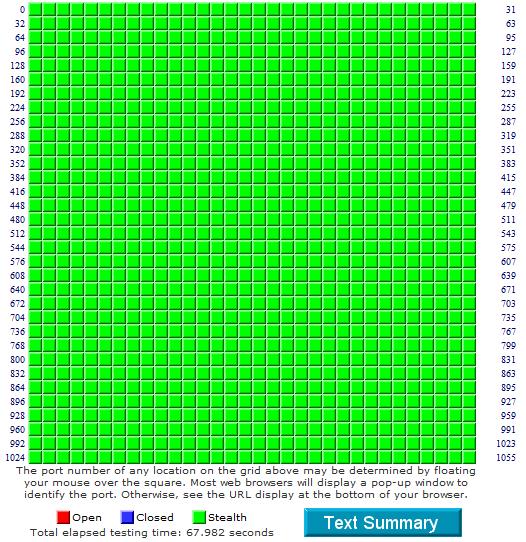
These nat translation/firewall settings show all stealth and no responses to www.grc.com intrusion detection test:
" Your system has achieved a perfect "TruStealth" rating. Not a single packet, solicited or otherwise, was received from your system as a result of our security probing tests. Your system ignored and refused to reply to repeated Pings (ICMP Echo Requests). From the standpoint of the passing probes of any hacker, this machine does not exist on the Internet. Some questionable personal security systems expose their users by attempting to "counter-probe the prober", thus revealing themselves. But your system wisely remained silent in every way. Very nice."
GRC Port Authority Report created on UTC: 2008-12-08 at 19:27:32
Results from scan of ports: 0-1055
0 Ports Open
0 Ports Closed
1056 Ports Stealth
---------------------
1056 Ports Tested
ALL PORTS tested were found to be: STEALTH.
TruStealth: PASSED - ALL tested ports were STEALTH
- NO unsolicited packets were received
- NO Ping reply (ICMP Echo) was received.
My Config:
service nagle
no service pad
service telnet-zeroidle
service tcp-keepalives-in
service tcp-keepalives-out
service timestamps debug datetime
service timestamps log datetime
service password-encryption
service pt-vty-logging
service sequence-numbers
hostname 837
boot-start-marker
boot-end-marker
logging buffered informational
enable secret 5 $1$hH3w$knAAqB5.WH4zE8pc1SJDb.
no aaa new-model
resource policy
clock timezone gmt 0
clock summer-time gmt recurring
clock save interval 8
no ip source-route
no ip dhcp use vrf connected
ip dhcp pool jetlag
network 192.168.1.0 255.255.255.0
default-router 192.168.1.254
dns-server 216.146.35.35 216.145.35.36
ip cef
ip name-server 192.168.1.254
no ip bootp server
ip ssh time-out 20
ip ssh version 2
username x privilege 15 secret 5 $1$3gHO$/LL7n9sWhTE1Til/IeV/P/
interface Ethernet0
ip address 192.168.1.254 255.255.255.0
ip nat inside
ip virtual-reassembly
no ip mroute-cache
snmp trap link-status permit duplicates
no cdp enable
hold-queue 100 out
interface Ethernet2
no ip address
shutdown
hold-queue 100 out
interface ATM0
no ip address
no ip mroute-cache
atm vc-per-vp 64
no atm ilmi-keepalive
dsl operating-mode auto
hold-queue 224 in
pvc 0/38
encapsulation aal5mux ppp dialer
dialer pool-member 1
interface FastEthernet1
duplex auto
speed auto
interface FastEthernet2
duplex auto
speed auto
interface FastEthernet3
duplex auto
speed auto
interface FastEthernet4
duplex auto
speed auto
interface Dialer1
ip address negotiated
ip access-group BLOCKWAN in
ip nat outside
ip virtual-reassembly
encapsulation ppp
dialer pool 1
dialer-group 1
ppp authentication chap pap callin
ppp chap hostname x@plusdsl.net
ppp chap password 7 071C3549580C1C031B0B1B0B50
ppp pap sent-username x@plusdsl.net password 7 0215105E1D030A274057191E51
ppp ipcp dns request
ppp ipcp wins request
no ip classless
no ip route static inter-vrf
ip route 0.0.0.0 0.0.0.0 Dialer1
no ip http server
ip http authentication local
no ip http secure-server
ip http max-connections 4
ip http timeout-policy idle 600 life 86400 requests 10000
ip nat inside source list LAN2WEB interface Dialer1 overload
ip access-list extended BLOCKWAN
permit tcp any any established
permit udp any any
ip access-list extended LAN2WEB
permit ip 192.168.1.0 0.0.0.255 any
logging trap debugging
logging 192.168.1.50
dialer-list 1 protocol ip permit
no cdp run
control-plane
line con 0
exec-timeout 20 0
password 7 03145E0E16
login local
no modem enable
transport output all
stopbits 1
line aux 0
transport output all
line vty 0 4
access-class 22 in
exec-timeout 120 0
password 7 0014160314
login local
length 0
transport input all
transport output all
scheduler max-task-time 5000
sntp logging
sntp server 131.173.17.7
sntp server 131.188.3.223
sntp broadcast client
end
The SH IP ACCESS LISTS cmd gives:
Extended IP access list BLOCKWAN
10 permit tcp any any established (65018 matches)Extended IP access list LAN2WEB
10 permit ip 192.168.1.0 0.0.0.255 any (2652 matches)Note that the above settings require UDP allowed also so my sntp time and other services will work. As the "permit tcp" option is the only one that allows the "established" part but the other protocols DONT (UDP et al are a connectionless protocols so cant be "handshake" established etc.), you have to allow for UDP to "any any" as it doesnt work with the subnet and wildcard mask info...due to NAT I guess?
Also, the ICMP allows host ping returns to/from the Internet, but the AP remains stealthed from the WAN, as shown with all greens from www.grc.com Common Service Ports scan below. A double check with pcflank.com reveals other varied ports above 1055 are also stealthed:
1080 stealthed SOCKS PROXY Socks Proxy is an internet proxy serviceThis config still shows these ports as only closed for the known Trojans scan of PCFlank.com, so will look into stealthing these also.
Trojan: Port Status
GiFt 123 closed
Infector 146 closed
RTB666 623 closed
Net-Devil 901 closed
Net-Devil 902 closed
Net-Devil 903 closed
Subseven 1243 closed
Duddies Trojan 1560 closed
Duddies Trojan 2001 closed
Duddies Trojan 2002 closed
Theef 2800 closed
Theef 3000 closed
Theef 3700 closed
Optix 5151 closed
Subseven 6776 closed
Theef 7000 closed
Phoenix II 7410 closed
Ghost 9696 closed
GiFt 10100 closed
Host Control 10528 closed
Host Control 11051 closed
NetBus 12345 closed
NetBus 12346 closed
BioNet 12348 closed
BioNet 12349 closed
Host Control 15094 closed
Infector 17569 closed
NetBus 20034 closed
MoonPie 25685 closed
MoonPie 25686 closed
Subseven 27374 closed
BO 31337 closed
Infector 34763 closed
Infector 35000 closed
A re - run of these ports on GRC.com gave: Results from scan of ports: 123, 146, 623, 901-903, 1243, 1560, 2001, 2002, 2800, 3000, 3700, 5151, 6776, 7000, 7410, 9696, 10100, 10528, 11051, 12345, 12346, 12348, 12349, 15094, 17569, 20034, 25685, 27374, 31337, 34763, 35000
0 Ports Open
0 Ports Closed
33 Ports Stealth
---------------------
33 Ports Tested
ALL PORTS tested were found to be: STEALTH.
TruStealth: FAILED - ALL tested ports were STEALTH,
NO unsolicited packets were received,
A PING REPLY (ICMP Echo) WAS RECEIVED
Steve 2008-2022